
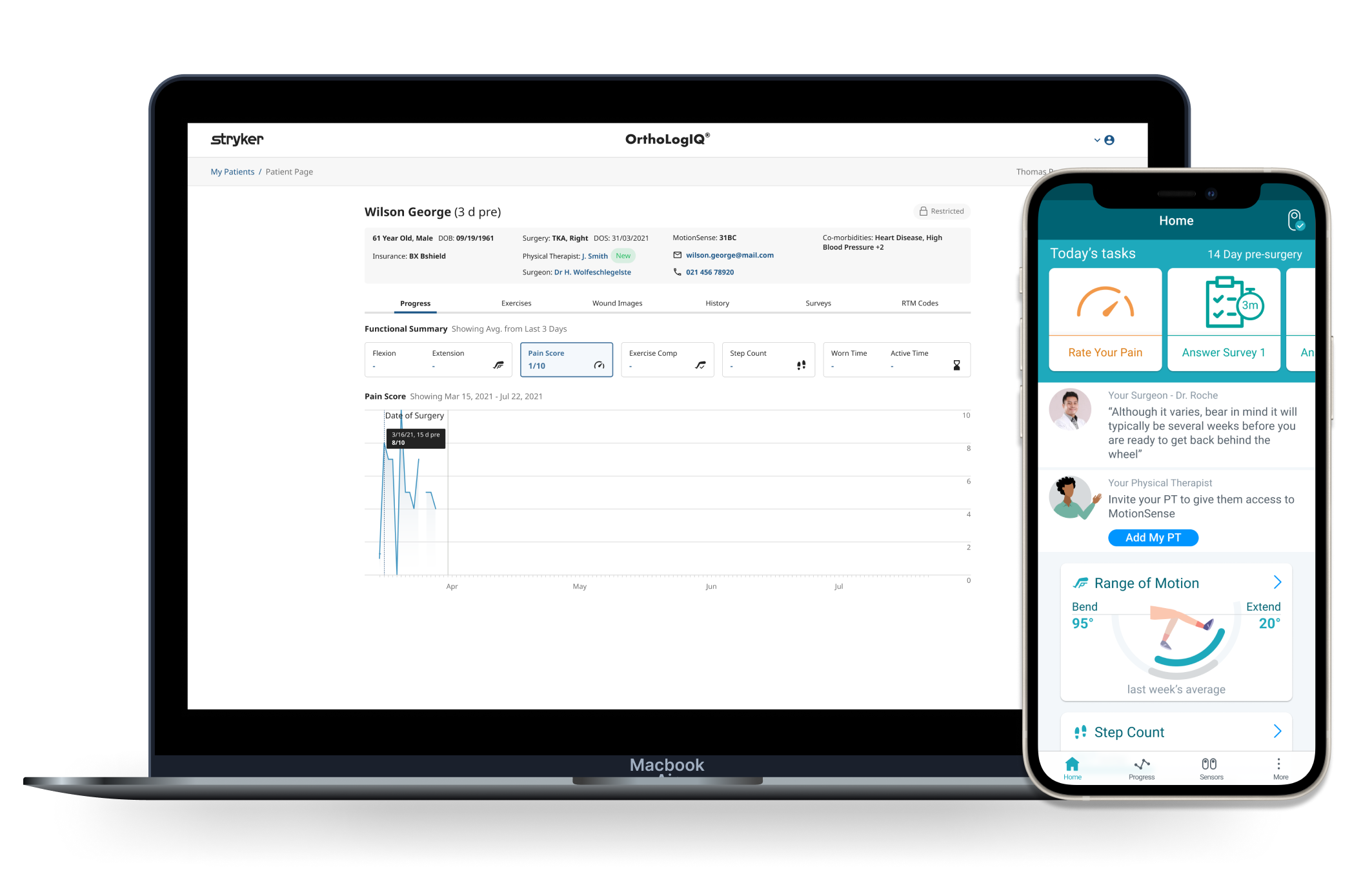
Overview: Designing the PT Access Feature
As a Senior Staff UX/UI Designer at Stryker, I led the design of a major platform expansion - enabling external Physical Therapists (PTs) to access OrthoLogIQ and MotionSense.
This allowed PTs to support patients remotely, improving recovery outcomes while reducing clinician workload.
Led UX strategy from early concept through delivery across MotionSense and OrthoLogIQ
Defined the permissions model, invitation and onboarding flows from scratch
Mapped PT scenarios and service flows to expose edge cases before UI work began
Drove alignment across Product, Engineering and clinical stakeholders
Delivered wireframes, prototypes and production ready UI end to end
Designed and documented PT Access components within the OIQ Design System, maintaining consistency across the platform.
Team Composition: Remote Developers, User Researcher, Marketing, Product Managers and QA/Test Engineers.
Timeline: January 2023 - May 2023: Approx 4.5 months (9 sprints)
Context & Underlying Problem

The Problem?
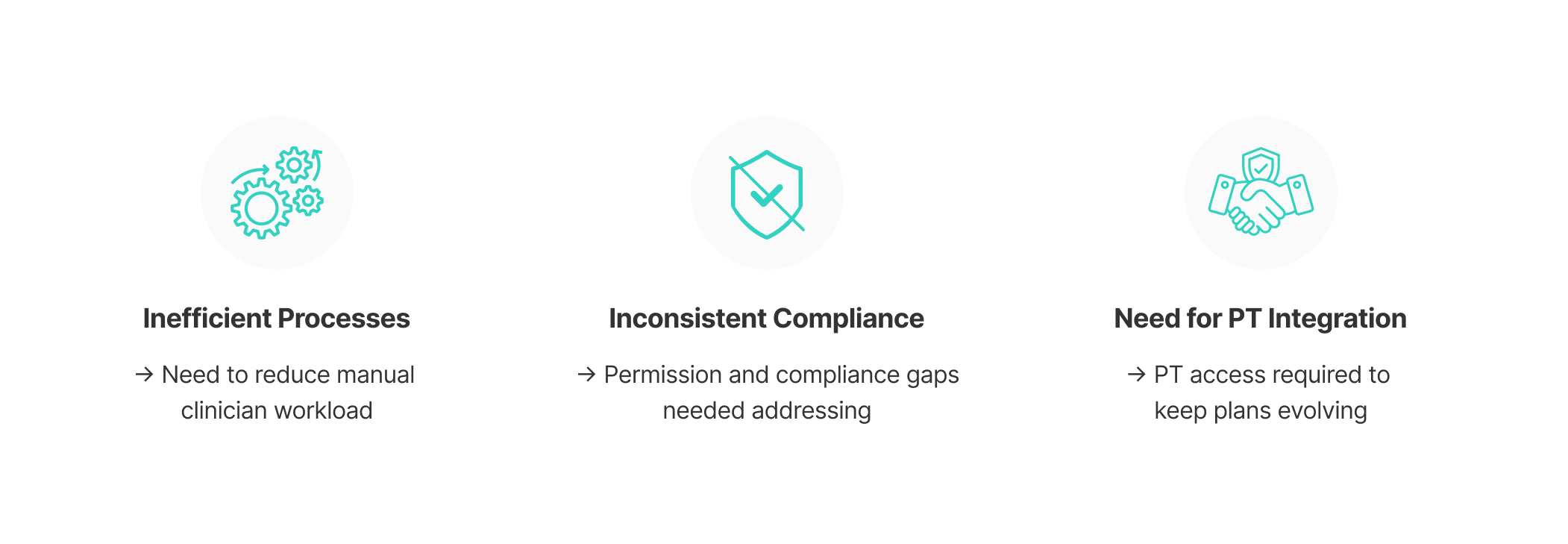
Busy clinicians had limited time to update recovery plans, leaving patients with stale exercises and declining engagement.
Patients weren't unmotivated - their programmes simply weren't evolving. Without a way to share that care responsibility, adherence dropped and outcomes suffered.
What the teams believed
Patients were disengaging because they ‘lacked motivation’ during recovery.
What I observed
Engagement dropped as plans stagnated. Clinicians rarely refreshed recovery plans due to workload, so programmes became repetitive. Patients weren't unmotivated - they were unsupported.
The reframe I drove
I treated this as a support continuity problem, not a motivation problem. Patients needed plans that evolved alongside their progress, and more meaningful contact with their PTs. That reframe shaped the entire design direction. Introducing PT access meant recovery plans could be updated continuously through therapist collaboration, not just at scheduled clinical appointments.
This mattered from a business perspective too. Sustained patient engagement was critical - keeping patients active on MotionSense enabled ongoing clinician monitoring and ensured OrthoLogIQ delivered long term value, not just short term compliance. Addressing this meant introducing a new user type into a clinically sensitive system, with careful consideration of privacy, permissions and clinician oversight.
Problem Statement
“External Physical Therapists need a safe way to manage and progress patients’ rehabilitation remotely, despite not being part of a surgeon’s practice or hospital system.”
My Role in Steering the Outcome
Strategic decisions I drove
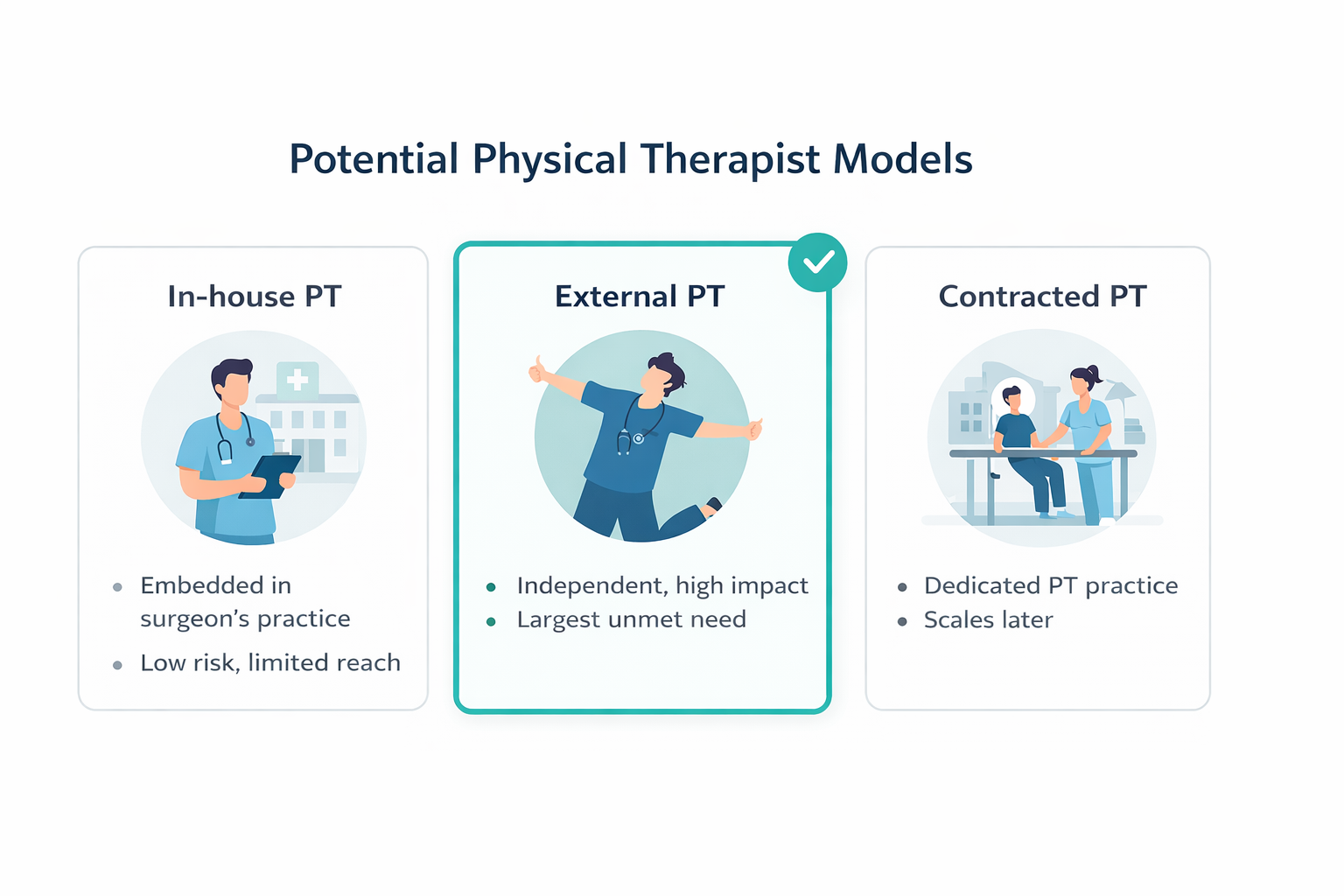
I explored three Physical Therapist (PT) models:
In house PTs
External PTs
Contracted PTs
The team's instinct was to start with in-house PTs. I pushed to prioritise External PTs first despite higher regulatory complexity, because solving the hardest access model early meant we wouldn't have to rebuild the permissions foundation later.
I chose a ‘patient invited’ onboarding model specifically to preserve consent control and reduce regulatory exposure. Not the fastest path, but the right foundation.
I defined MVP permission boundaries by mapping what "safe to ship" looked like, giving Engineering and Product a clear line to build to and preventing scope creep from bleeding into the design phase.
Execution leadership
I surfaced a critical permissions conflict before any UI work began. Engineering's initial model would have duplicated logic across both platforms. I ran scenario mapping sessions, redirected the approach and prevented significant downstream rework.
I facilitated alignment sessions across Product, Engineering and clinical stakeholders until teams reached a single agreed direction, so the design phase started on stable foundations.
I mapped the full cross platform workflow with Engineering to ensure PT onboarding, recovery updates and data visibility behaved cohesively across both systems.
I reframed stakeholder layout discussions around scannability and information hierarchy rather than visual preference, keeping critical patient data visible when PT details were introduced.
Impact
First time external PTs could access either platform. Before this, there was no mechanism for therapist collaboration once patients left the clinic, regardless of recovery need.
I reduced clinician administrative workload by enabling shared care responsibilities between surgeons and PTs, freeing clinicians to focus on higher complexity cases rather than routine recovery management.
I established the permissions and onboarding architecture that future PT-facing features and billing workflows will build on. This wasn't a one off feature, it was infrastructure.
Business Strategy
Expanding OrthoLogIQ to include Physical Therapists as active users enabled recovery plans to be managed and evolved beyond surgeon led workflows.
This improved clinical outcomes while unlocking a commercial opportunity to grow the user base, position PTs as contracted customers, and increase platform stickiness across the wider care ecosystem.
It also established a foundation for future reimbursement and billing workflows across healthcare professionals.
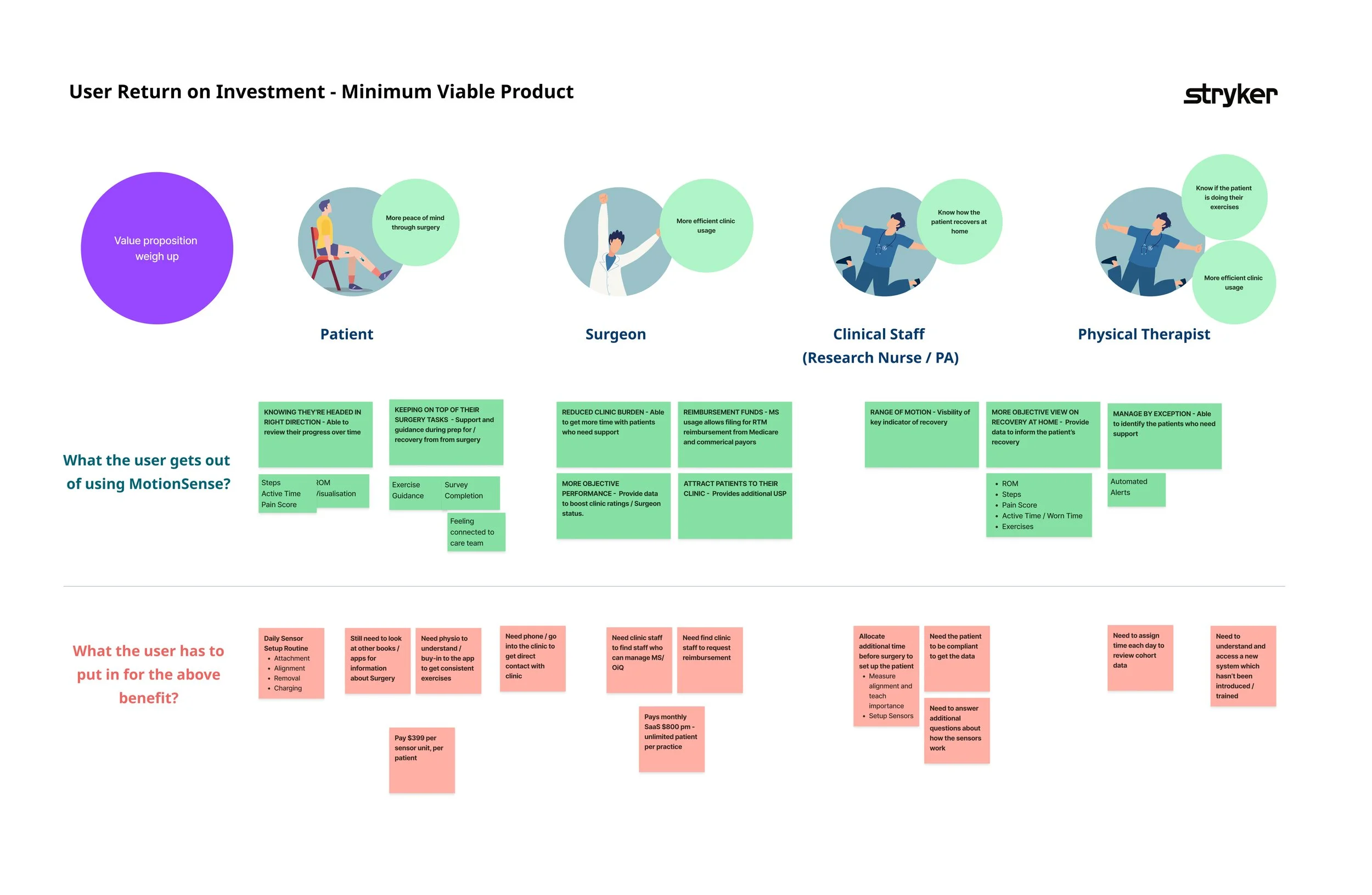
Early value hypothesis (internal)

Project Objectives
Primary Goal:
Enable Physical Therapists to safely support patient recovery remotely by integrating PT Access into OrthoLogIQ.
This allowed PTs to:
View relevant patient recovery information
Update and progress exercise plans
Monitor recovery outside of in clinic visits
Supporting goals
Improve patient adherence through more responsive, evolving rehabilitation plans
Reduce clinician workload by shifting routine plan updates to PTs
Strengthen collaboration between patients, PTs, and clinicians
Maintain clinical safety through clear permissions, consent, and oversight
Empower patients to invite their own PTs via the MotionSense app
Research and Insights
Primary insight
A clear pattern emerged across conversations: patient disengagement was closely tied to how often recovery plans were updated.
I reframed the problem from ‘patient motivation’ to ‘plan freshness’, which shifted the solution direction away from reminders and toward enabling PT involvement within the platform.
Clinicians described limited capacity to refresh exercises alongside clinical workloads. As programmes became repetitive and less relevant, adherence dropped over time. This positioned PT involvement not as a feature addition, but as a structural way to keep recovery plans evolving and effective.
Supporting evidence
Signals that informed this shift included:
Manual exercise updates were time consuming and difficult for clinicians to maintain
Limited real time PT involvement created care gaps once patients left the clinic
Engagement was strongest early in recovery and declined as plans stagnated
These patterns were reinforced during a stakeholder workshop in Florida, US, helping validate the direction across clinical and business perspectives.
Research inputs & constraints
Direct access to Physical Therapists (PTs) was not feasible due to organisational constraints, with marketing acting as an intermediary between design and end users. To maintain momentum, I adapted the research approach to focus on structured conversations with surgeons and clinicians, supported by internal stakeholders and existing data.
Competitive analysis & data review
To reduce uncertainty around safe PT integration, I reviewed how comparable platforms support PT workflows, focusing on access models, permissions and flow structure. This helped identify common patterns and gaps, informing early decisions around safe PT access, scope boundaries, and MVP prioritisation.
Focused Design Implications from Research
From Strategy to System Design
With external PTs selected as the primary user group, the design challenge shifted from who to enable to how to enable them safely.
I mapped each PT model against differences in access control, permissions, operational complexity, and clinical oversight. This surfaced key constraints that directly shaped the solution - including patient initiated invitations, restricted data visibility, and time bound access.
These constraints informed the system architecture and MVP scope, ensuring the solution could support external PTs safely while remaining scalable to future PT models.
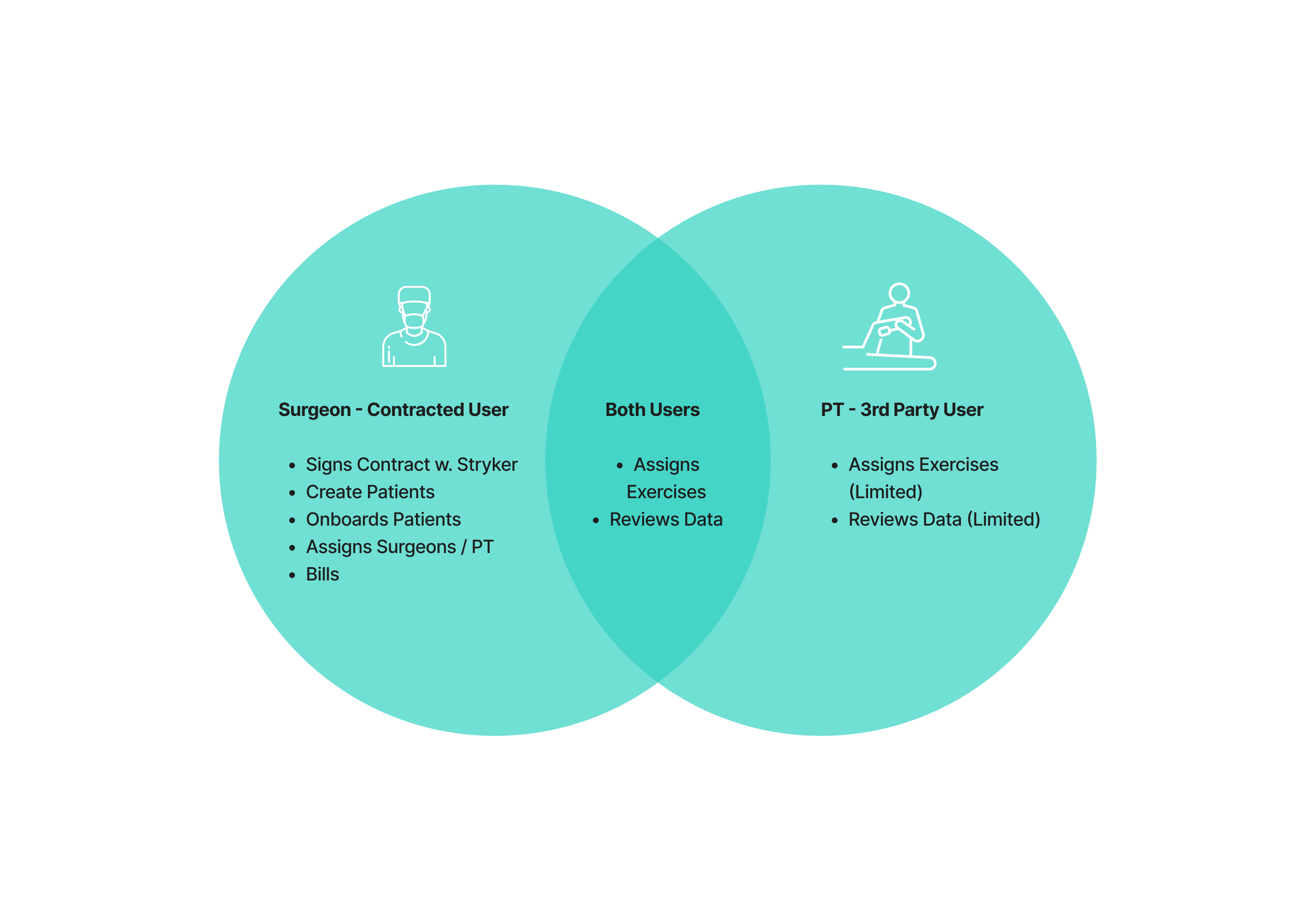
Roles & permissions overview — validating feasibility, safety, and scalability
I focused on defining the minimum set of interactions required to safely support recovery beyond the clinic:
Patient initiated PT invitations via the MotionSense app
Secure PT onboarding and credential verification
Clear permission boundaries to protect patient data
PT led exercise updates and progress tracking
Safeguards for error handling and access expiry
Execution I Drove
Throughout the project, my role focused on shaping direction under ambiguity while helping Product and Engineering align around safe, scalable decisions. Rather than working within a fixed brief, I helped define how the system should evolve as new Physical Therapist workflows were introduced.
Rather than working within a fixed brief, I helped define how the system should evolve as new Physical Therapist workflows were introduced.
De-risking access through a privacy first model
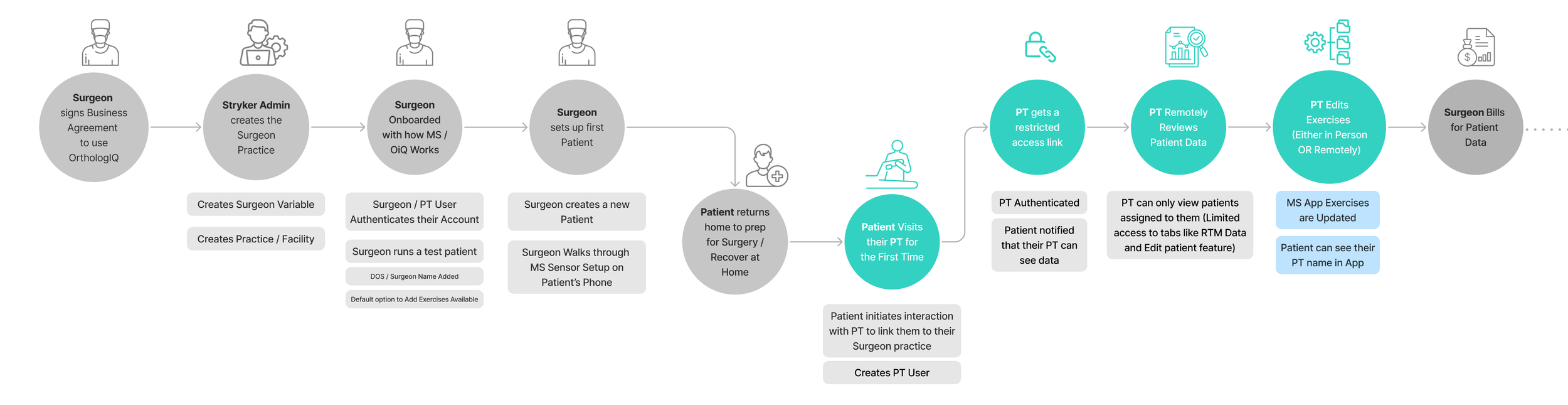
Early flow exploration used to compare access models, permissions and operational complexity.
I prioritised External PTs first, despite higher regulatory complexity, because solving the hardest access model early created a scalable foundation for future PT types. I chose a patient invited access model because it preserved clinician oversight and ensured therapists only accessed patients who had explicitly granted permission, reducing regulatory risk while enabling collaboration.
While mapping invitation flows, I spotted that external PTs would arrive with no context about either platform - the whole team had assumed patients would brief their own therapist. I challenged that assumption and proposed a dedicated landing experience to explain both platforms clearly, removing a dependency that would have created friction at a critical onboarding moment.
Aligning system permissions before UI design
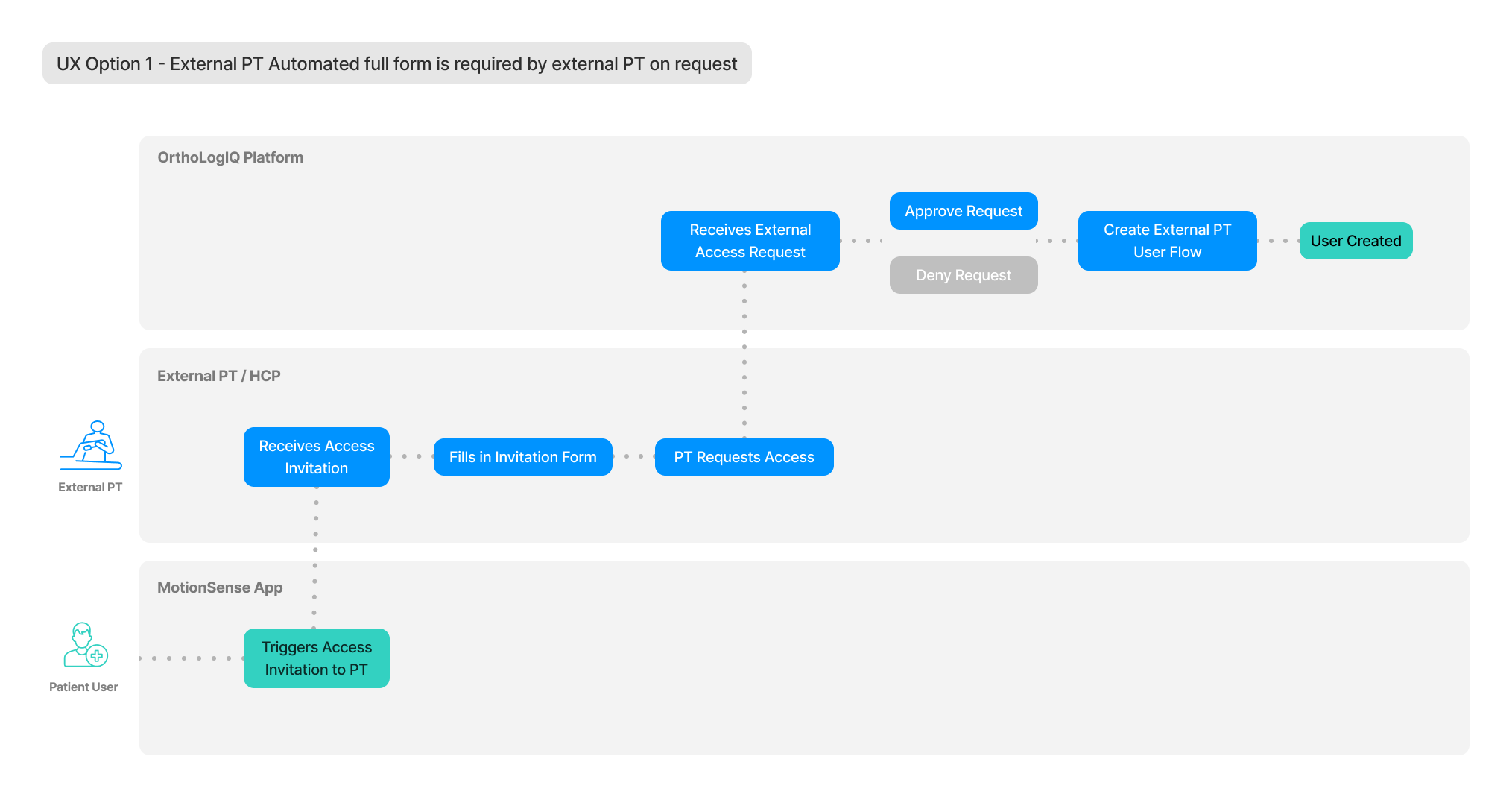
Backend wireframe proposal reviewed with the Software Development Manager through discussions with the wider stakeholder team
I mapped system level flows and worked directly with Engineering to define backend logic: invitation expiry rules, approval workflows, NPI validation and clear visibility boundaries across both platforms - ensuring patient safety and regulatory compliance while remaining technically feasible. I did this before any UI work started, because UI decisions that don't reflect underlying system behaviour create disconnected experiences and expensive fixes later. By addressing these questions early, we avoided reworking core architecture as new PT types were added.
Protecting clinical clarity through safety led design
I ran stakeholder workshops using mapped PT scenarios to guide decisions around permissions, onboarding and service flows. I mapped key scenarios and service flows across both platforms to expose edge cases early. I also reframed layout discussions around patient safety rather than visual preference, shifting stakeholder conversations from surface level UI decisions to risk-aware design choices that supported safe use in practice.
Delivery
I designed and delivered onboarding UX and the PT landing experience end to end. Defined backend logic, covered specs, tickets, edge case definitions, Azure analytics setup and QA support through to delivery.
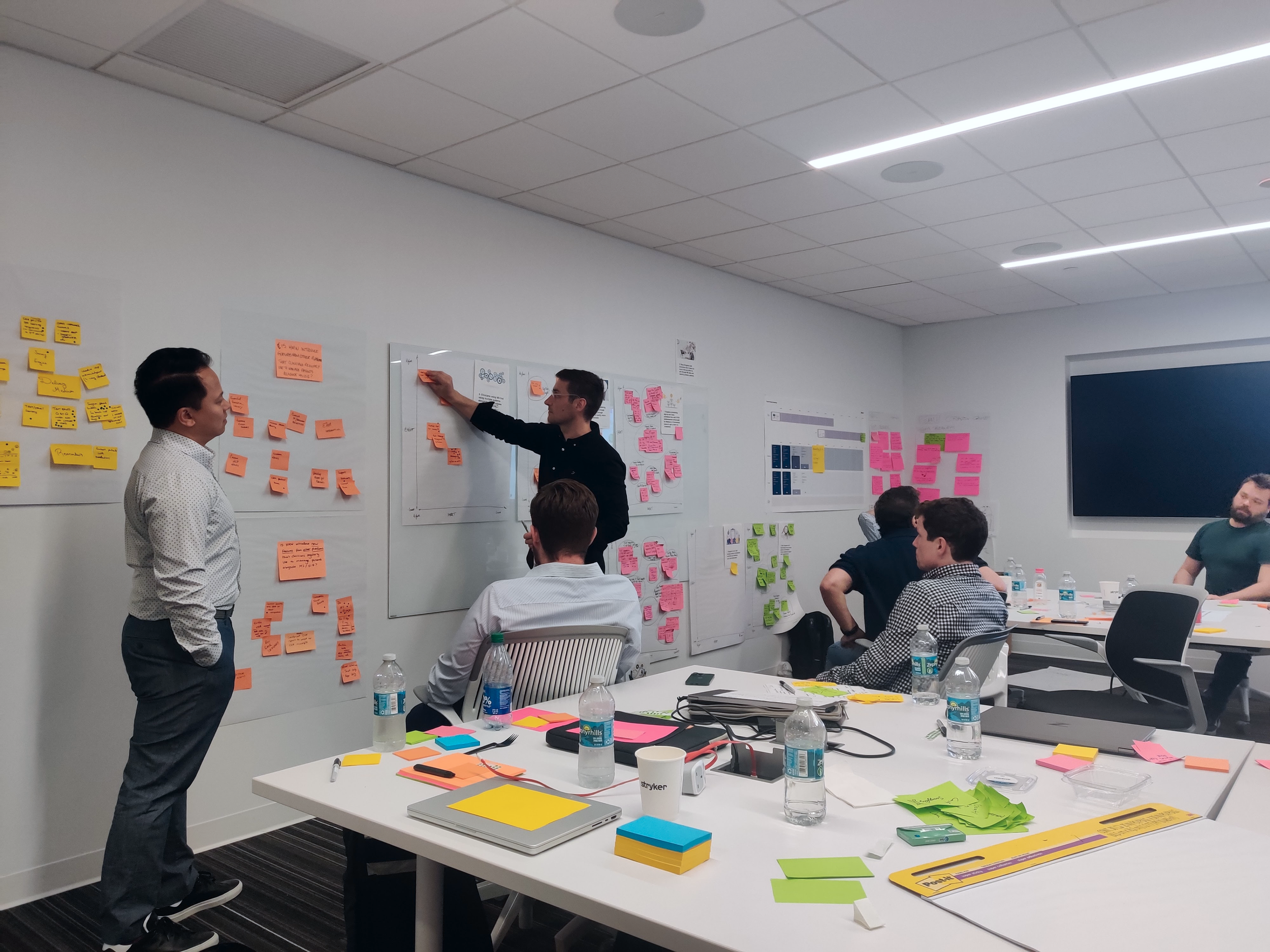
Insights gathered during a stakeholder workshop in Florida, US
Design exploration and iteration
To validate feasibility and de risk edge cases, I explored multiple wireframe directions across MotionSense and OrthoLogIQ.
This work focused on:
invitation flows
onboarding
access and permissions
expiry rules
cross platform interactions.
Rather than optimising individual screens, I prioritised system clarity - ensuring access boundaries were explicit, patient safety was maintained, and the experience scaled beyond a single workflow.
Insights from this exploration informed both MVP scope and final design decisions, allowing the team to move forward with confidence.
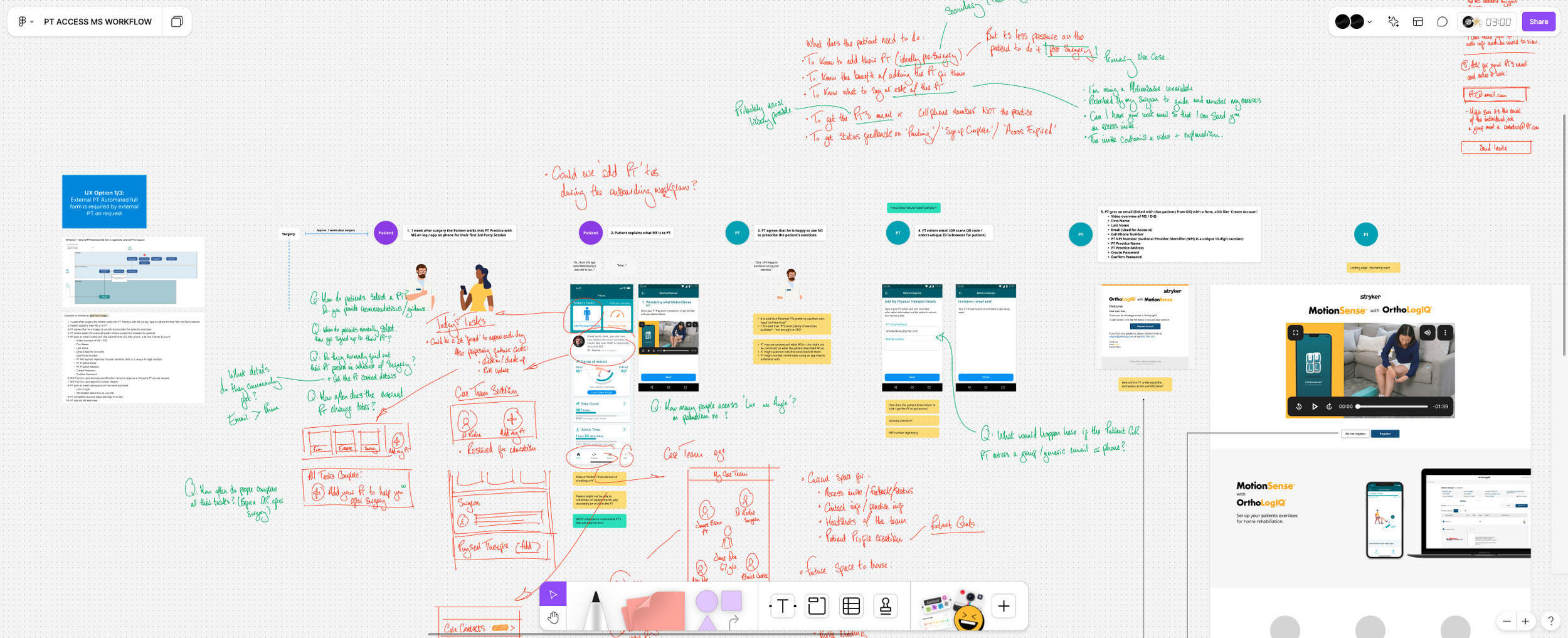
First round of wireframe flow - Concept functionality between the MotionSense app and OrthoLogIQ
https://www.figma.com/board/akt7mnzfmVOcGxKAKF8jmL/PT-ACCESS-MS-WORKFLOW?node-id=0-1&t=yzRhz5C1SbVPYvfs-1
Iterative Refinement:
Through iterative feedback with stakeholders, I refined invitation flows, onboarding requirements, and permission boundaries to improve clarity, safety and scalability.
Edge cases & access state handling
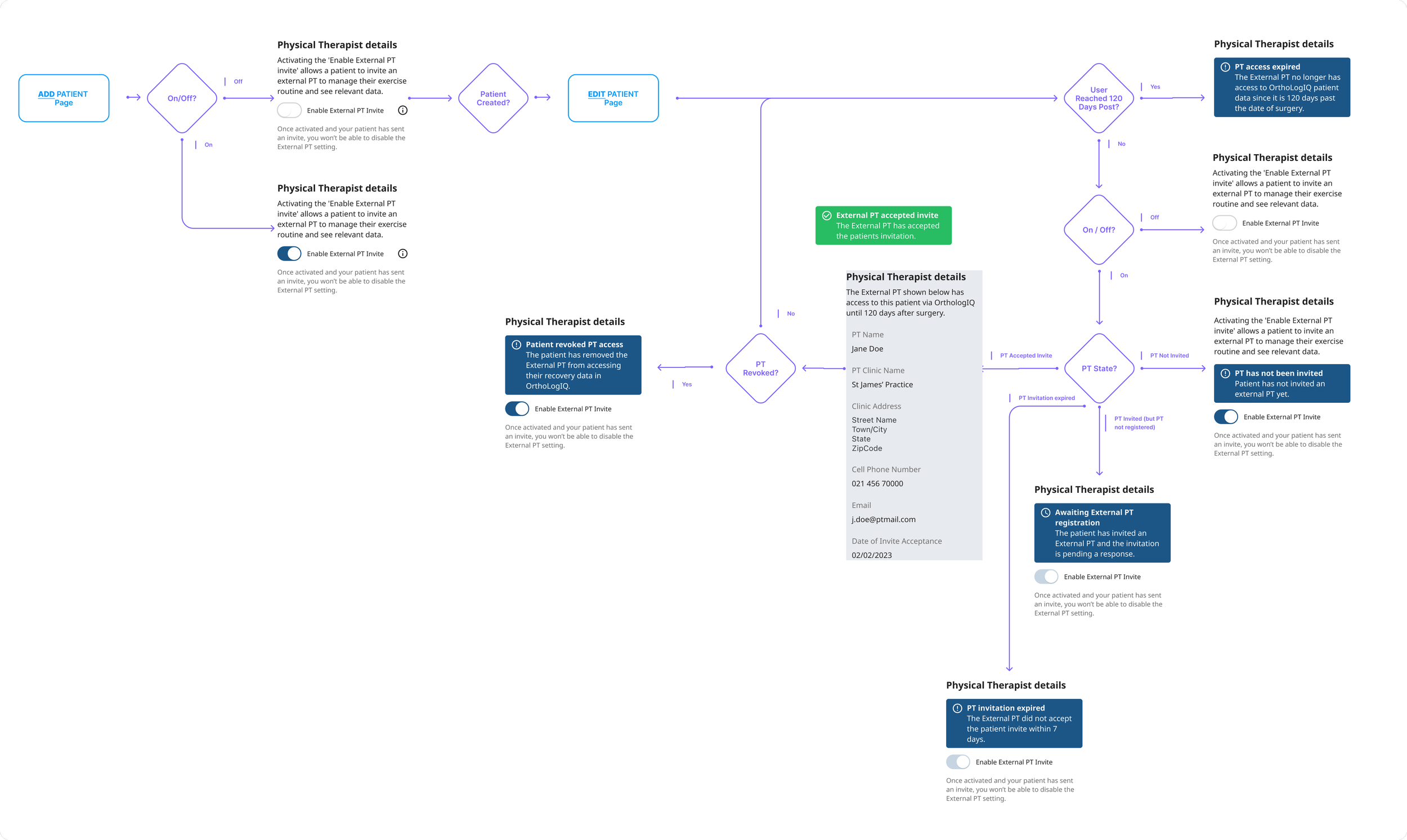
Figma Link - Exploration Toggle State Machine
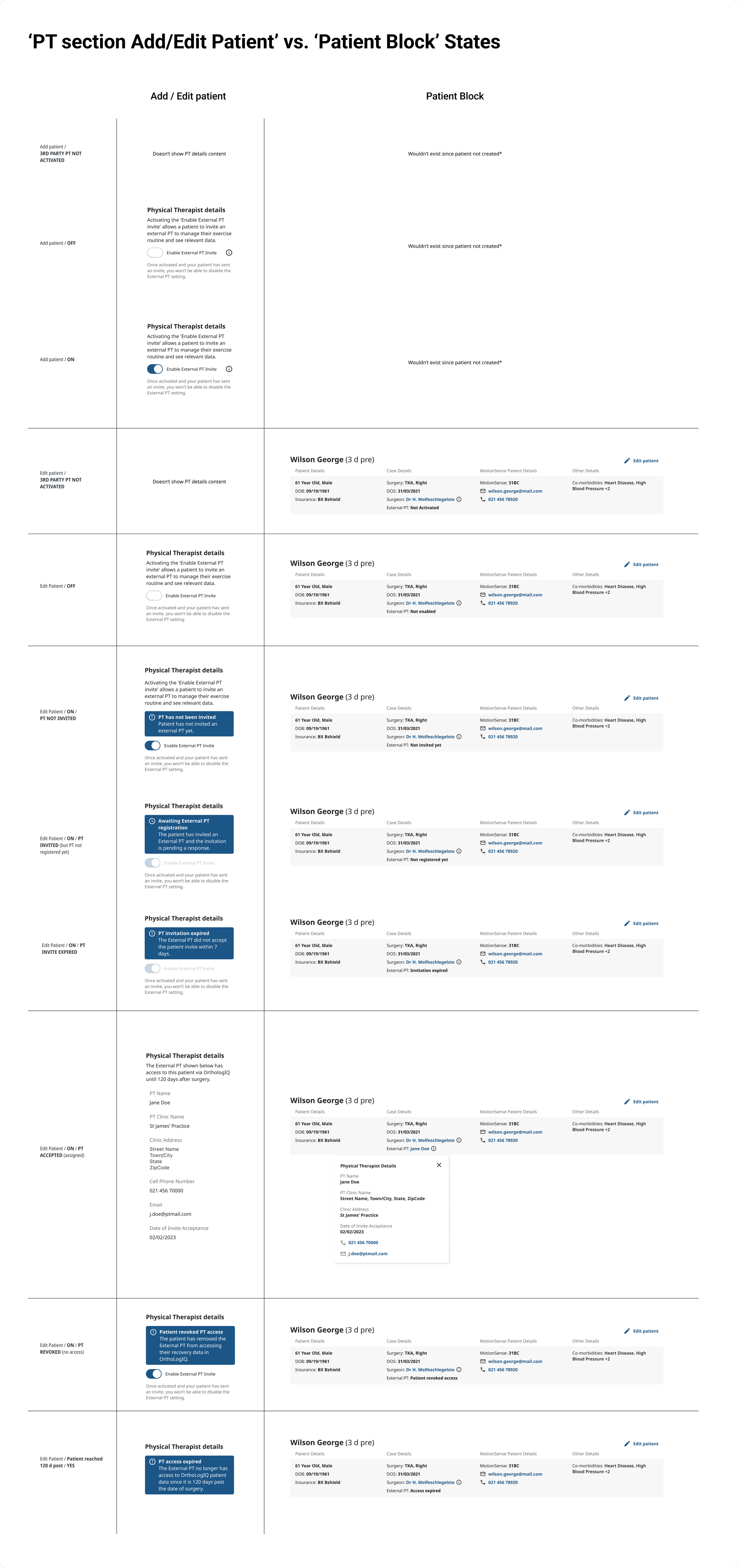
Design System: Building Within the OIQ Component Library
PT Access was designed and built within the OIQ Design System. New components introduced for this feature, including the PT toggle states, access status indicators and invitation flow UI, were documented with full states, variants and interaction specs in Figma, maintaining consistency with existing platform patterns and giving Engineering a clear reference for build.
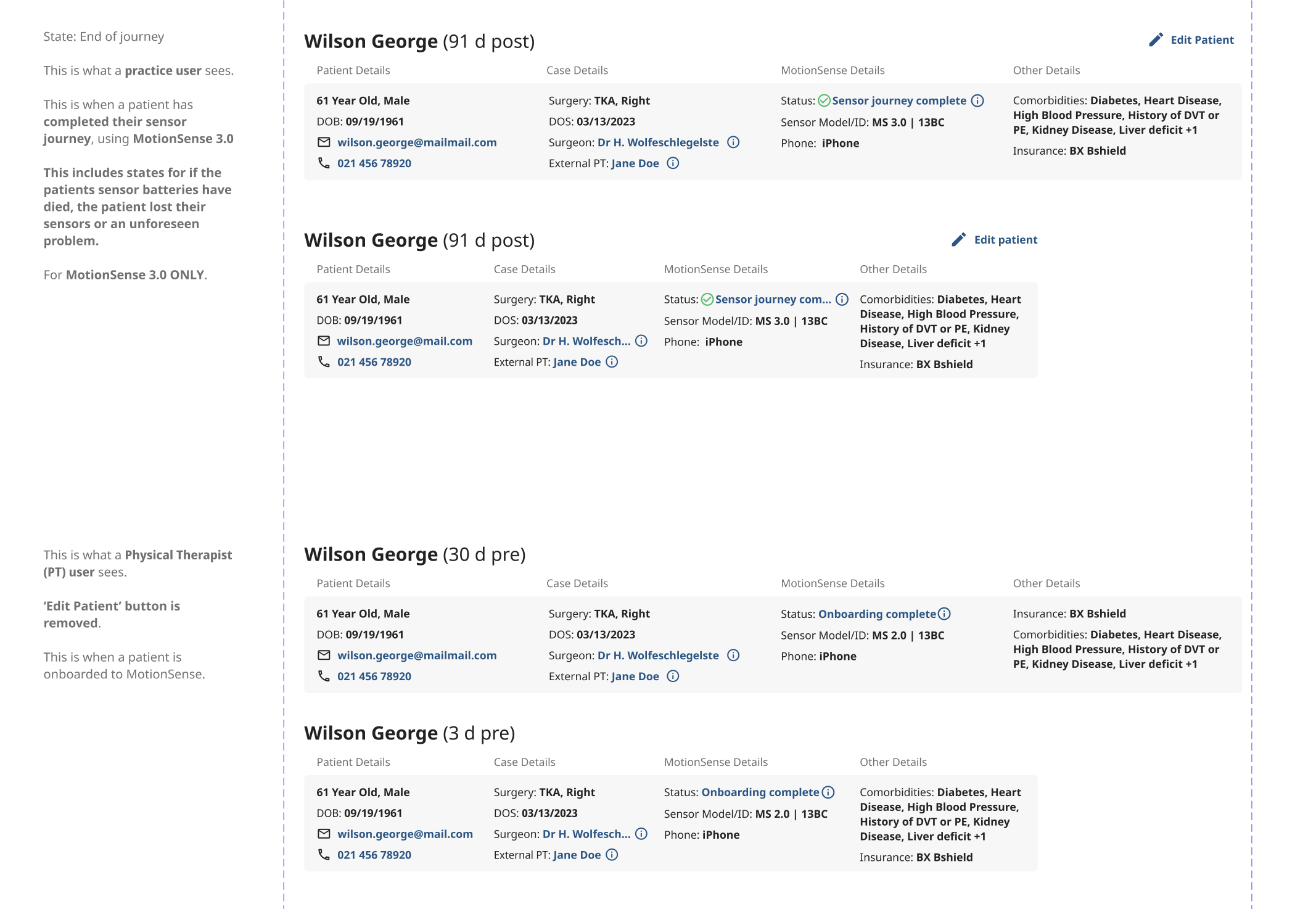
Maintaining information hierarchy with added PT data
Introducing PT access required adding new contact details into the patient details block, which also housed surgeon information. I noticed this risked overcrowding the section and pushing critical recovery data out of view.
Solution:
To address this issue, I reorganised the Patient Details block. This reorganisation was aimed at maintaining usability and ensuring that important content, such as patient progress graphs and data, was not pushed down or obscured.
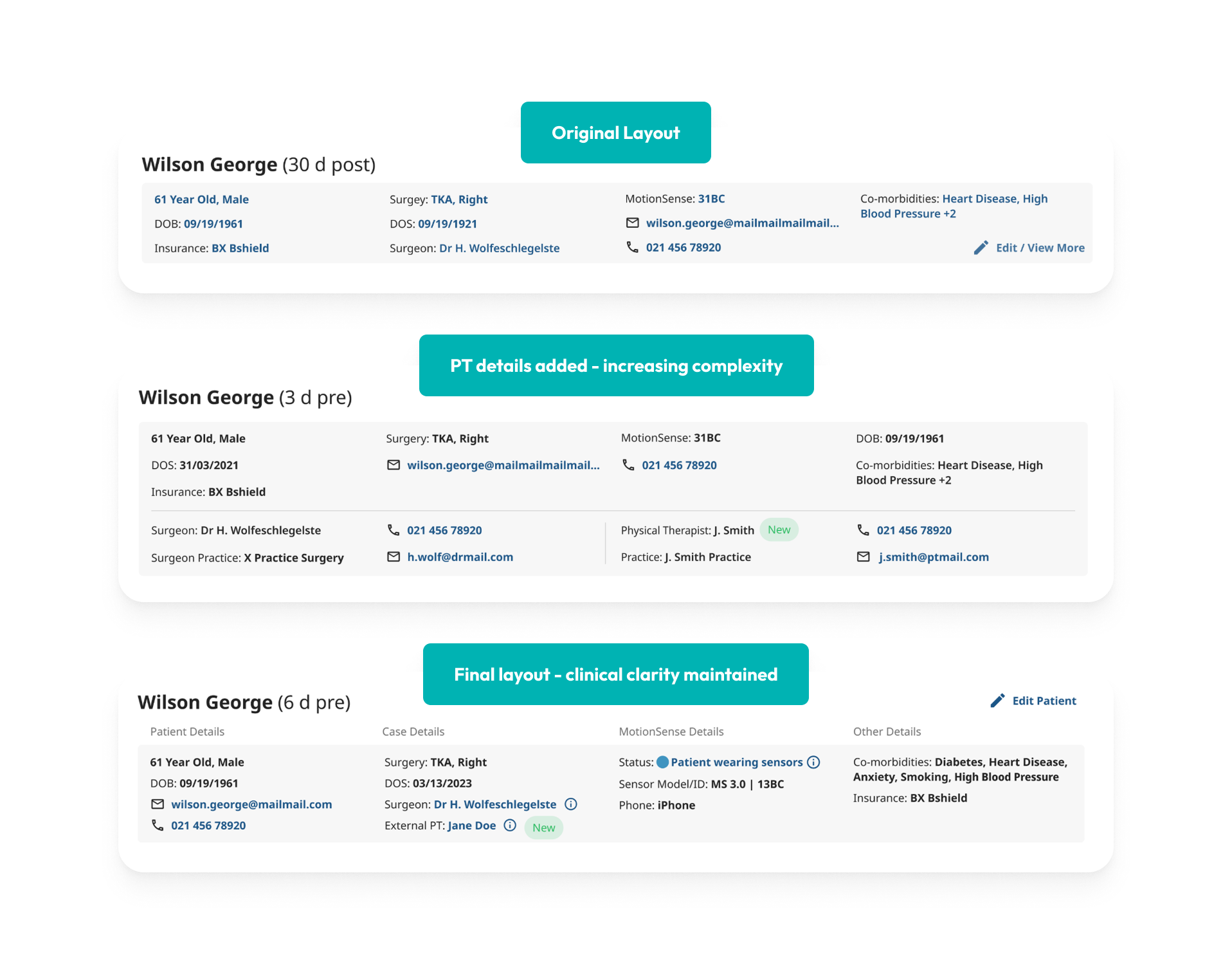
The final layout (Bottom Image) includes info icons which presented the user with contact information for both the Surgeon and PT.
It also highlights an additional feature, ‘Status,’ which was developed concurrently as a separate project.
Final validation and delivery
Decision to ship
We aligned on shipping once clinical safety was met, the core PT update behaviour was fully supported, and the remaining unknowns were better answered through real world use than further design.
Ahead of release, I partnered with Product and Engineering to validate edge cases and finalise technical details, including:
Access expiry
Credential verification
Invitation flows.
This ensured the solution met:
Clinical safety requirements
Aligned with platform constraints
Ready to scale beyond the initial MVP.
The final designs balanced usability, accessibility and secure PT access across MotionSense and OrthoLogIQ.
Key Insight - Addressing the Root Cause of Disengagement
PT involvement was a meaningful driver of engagement:
Patients whose exercises were updated by PTs showed 54% higher 30 day activity, signalling stronger long term adherence and recovery outcomes.
By enabling PTs to update and tailor exercises more regularly, we addressed the root cause of disengagement - not by pushing patients harder, but by keeping recovery plans fresh and relevant.
So we learned that engagement wasn’t about motivation - it was about capacity and freshness. PT access removed that bottleneck, and the engagement data validated that insight.
DEEP DIVE:
Detailed workflows, edge cases & delivery artefacts
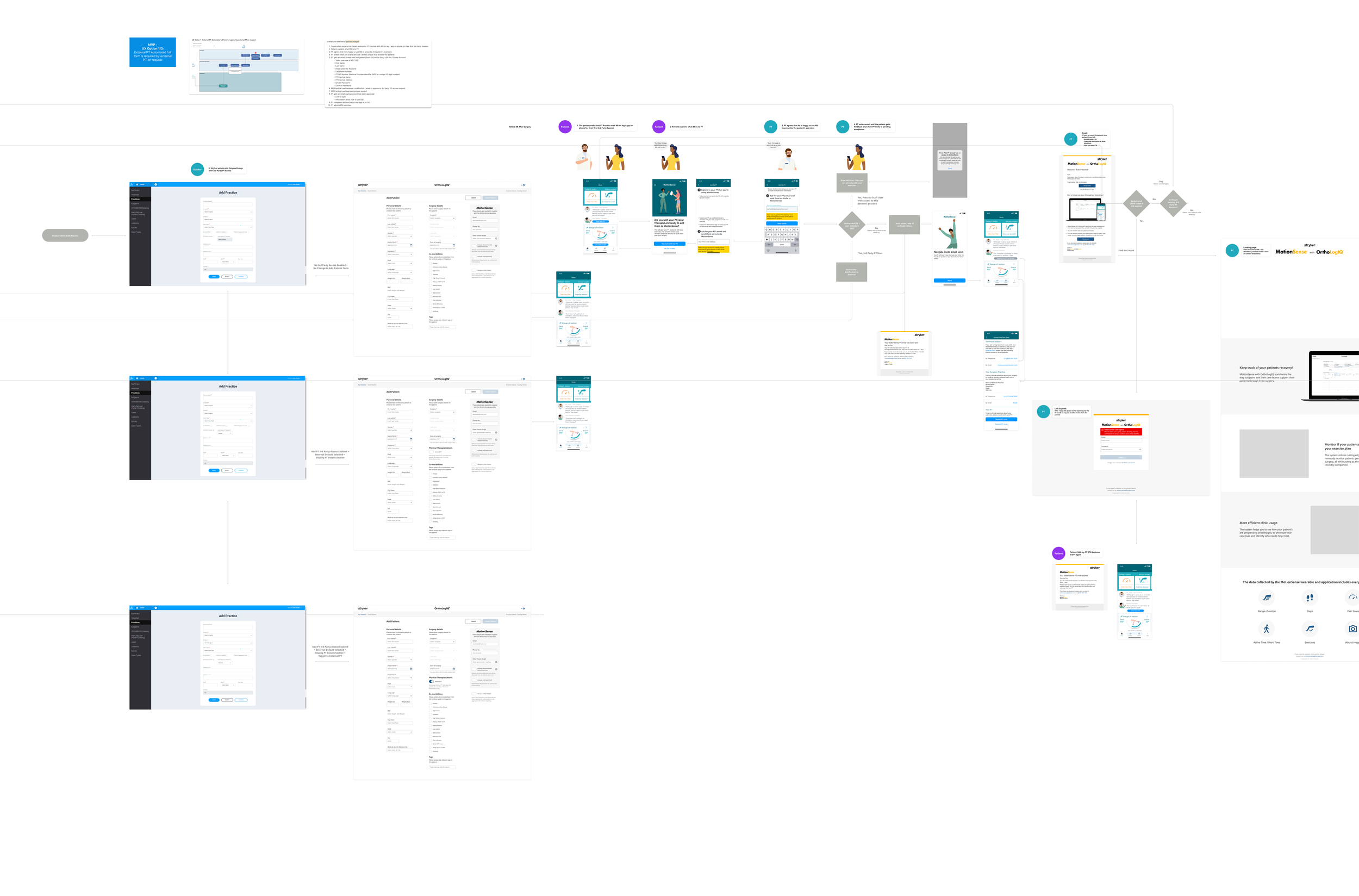
1.OrthoLogIQ Admin Controls:
The backend platform where clinicians can enable or disable PT access controls, allowing or restricting patient PT invitations.
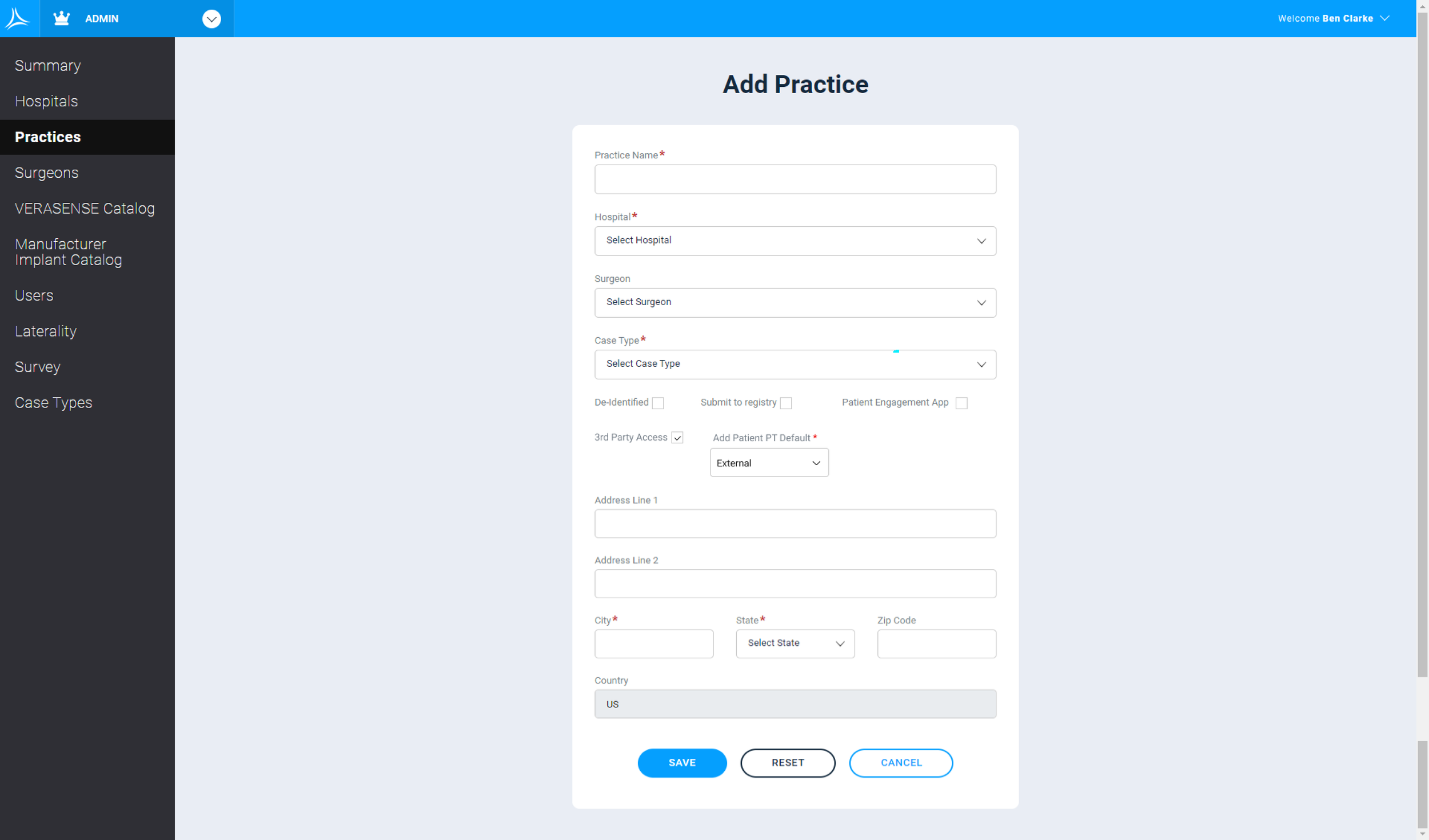
Admin Controls for Practice enabling PT Access: Those responsible of the practice were able to enable or disable the PT Access feature was to be used by a practice/clinicians or not
2. OrthoLogIQ Add Patient Page PT Access Toggle:
If PT access is enabled, clinicians see a toggle to allow or prevent patients from adding PTs.
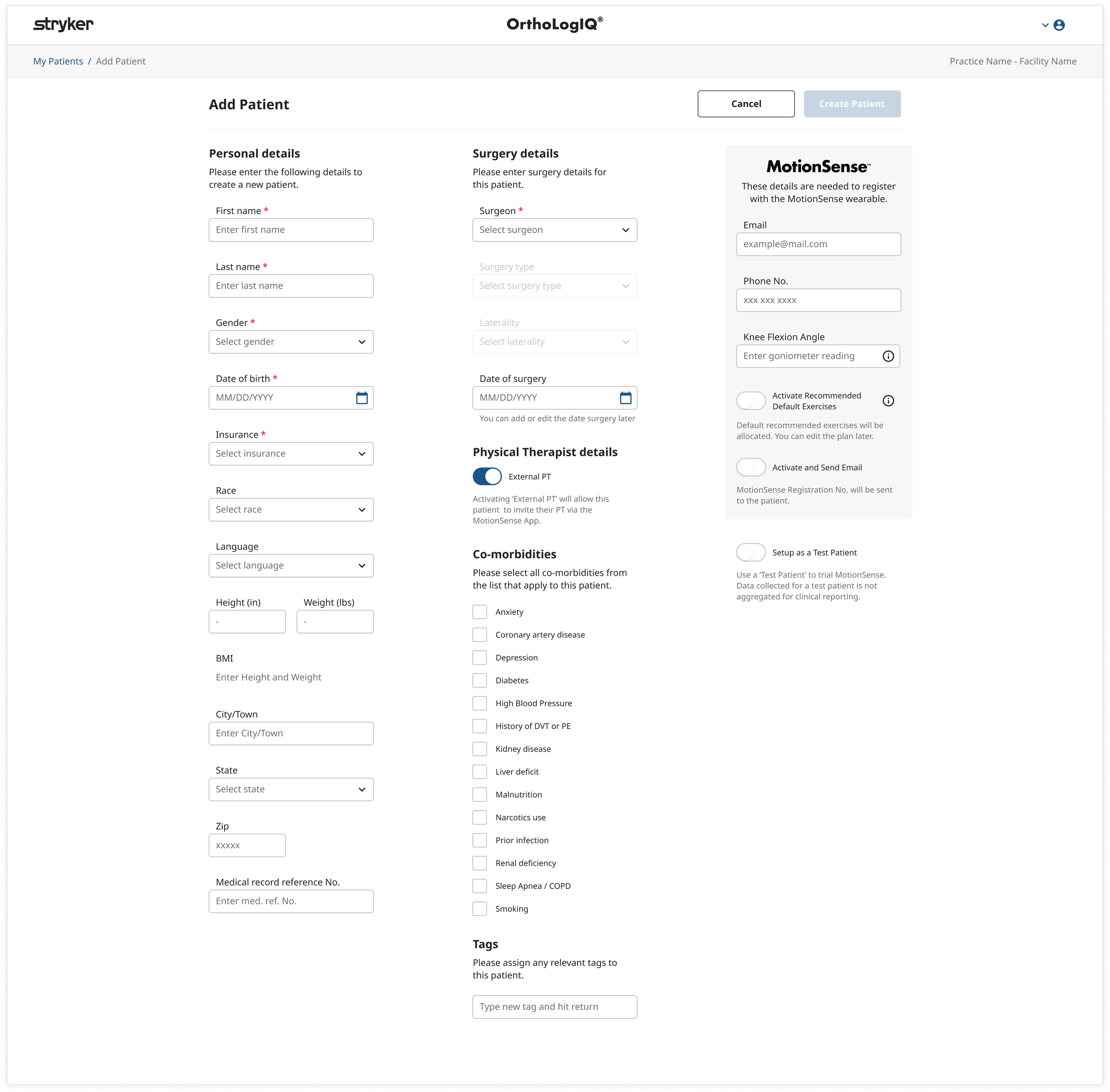
Physical Therapist Details Toggle: Clinician can enable if the PT Access feature was to be used by the patient or not
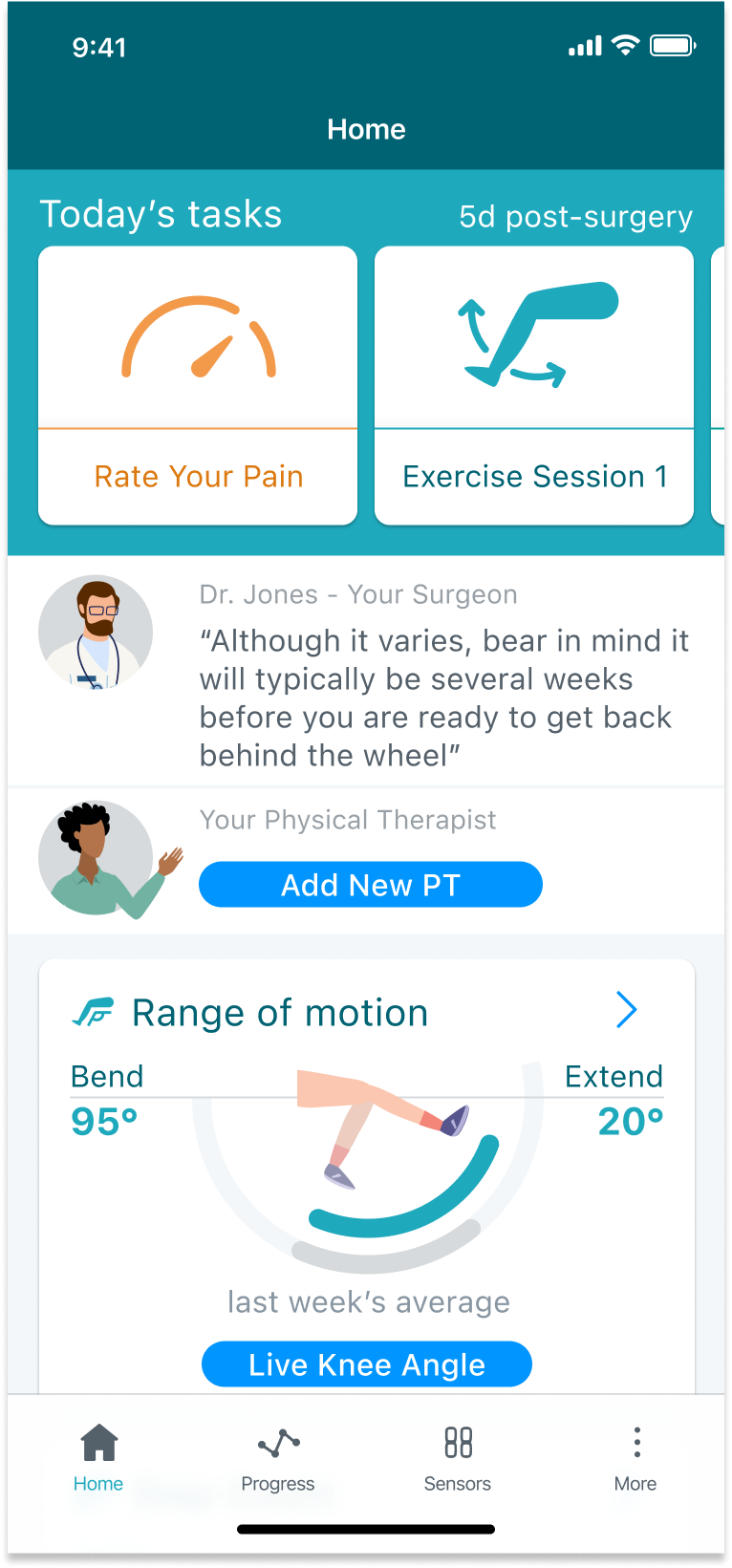
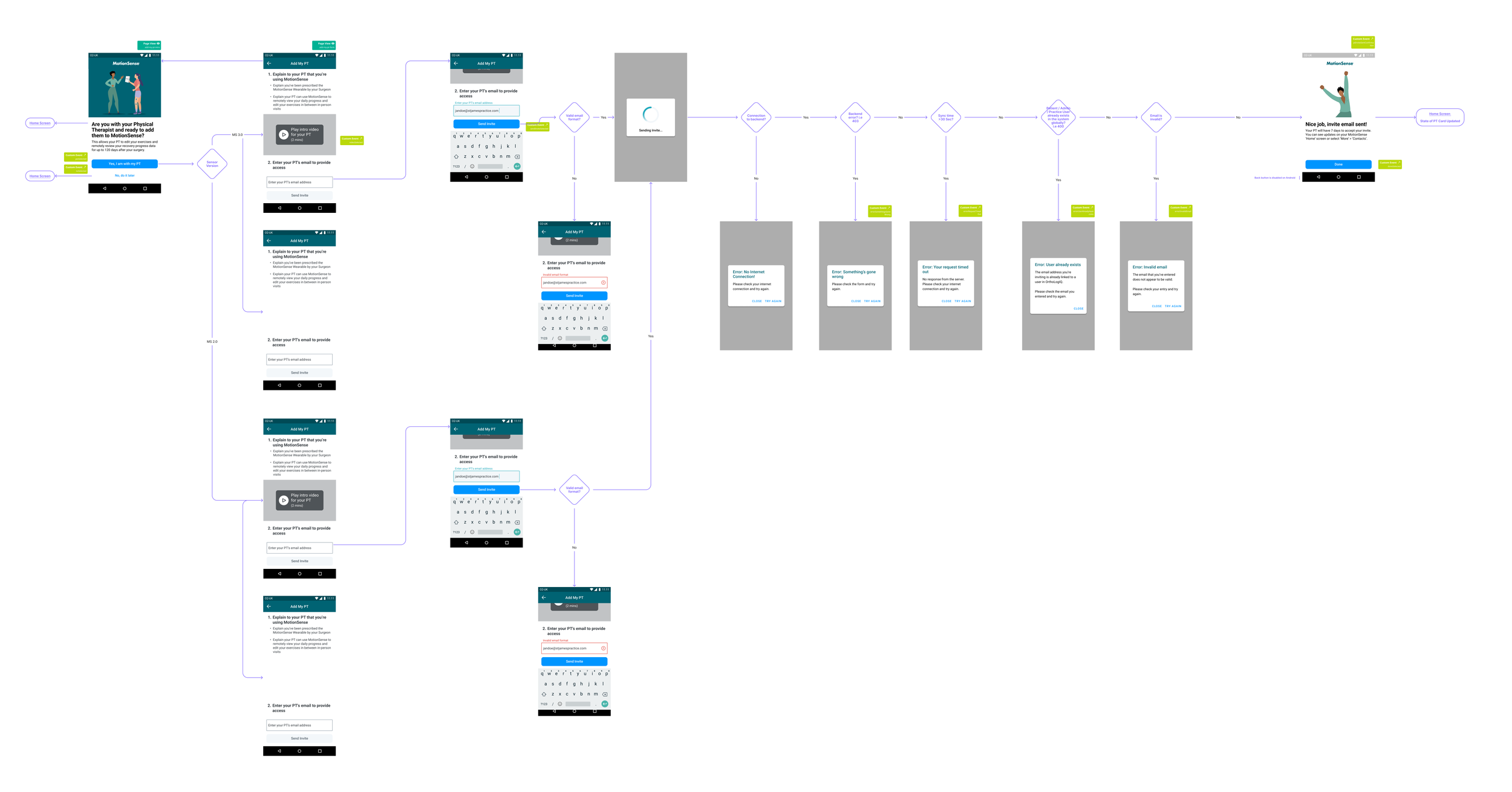
3. MotionSense App ‘Add PT’ Card:
Displays the option for patients to add their PT, based on whether PT access is enabled.
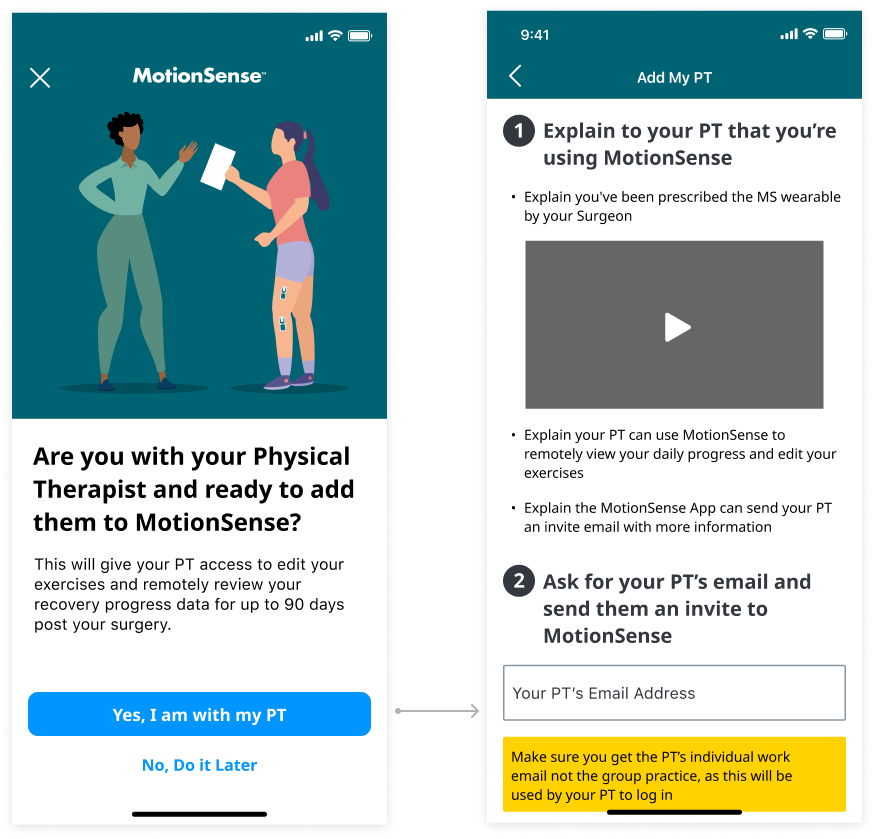
4. MotionSense App PT Email Input:
Patients enter their PT’s work email, which is validated in the backend to check for existing records.
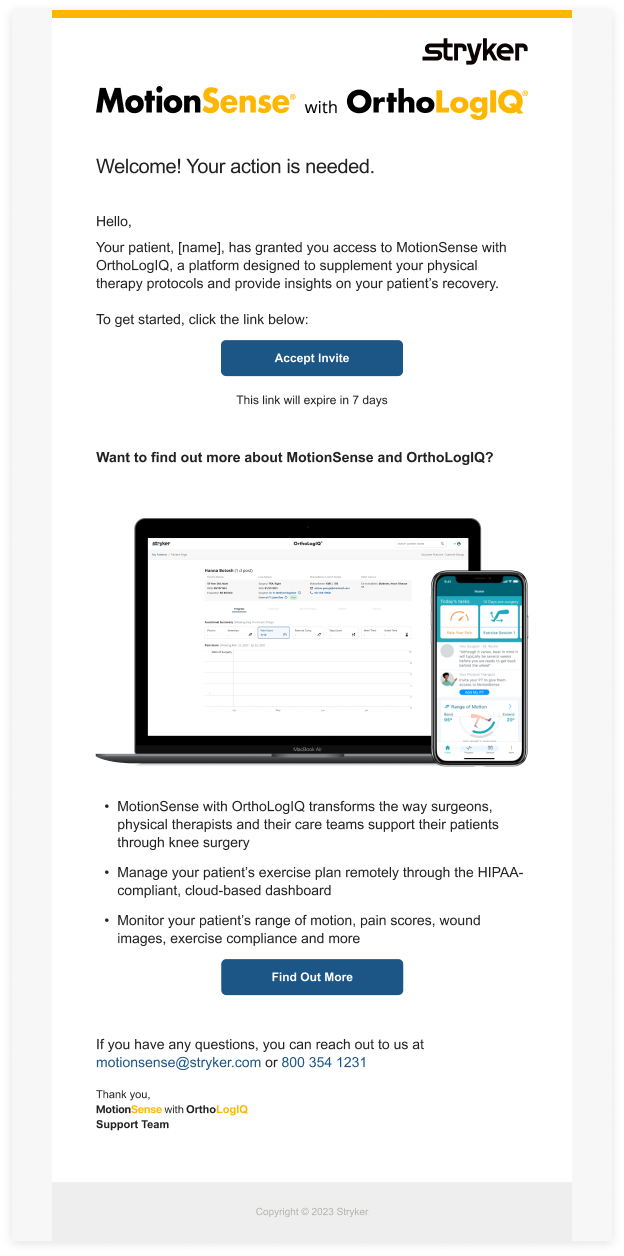
5. PT Invitation Email:
An invitation email is sent to the PT, allowing them to accept the invitation or learn more about MotionSense and OrthoLogIQ.
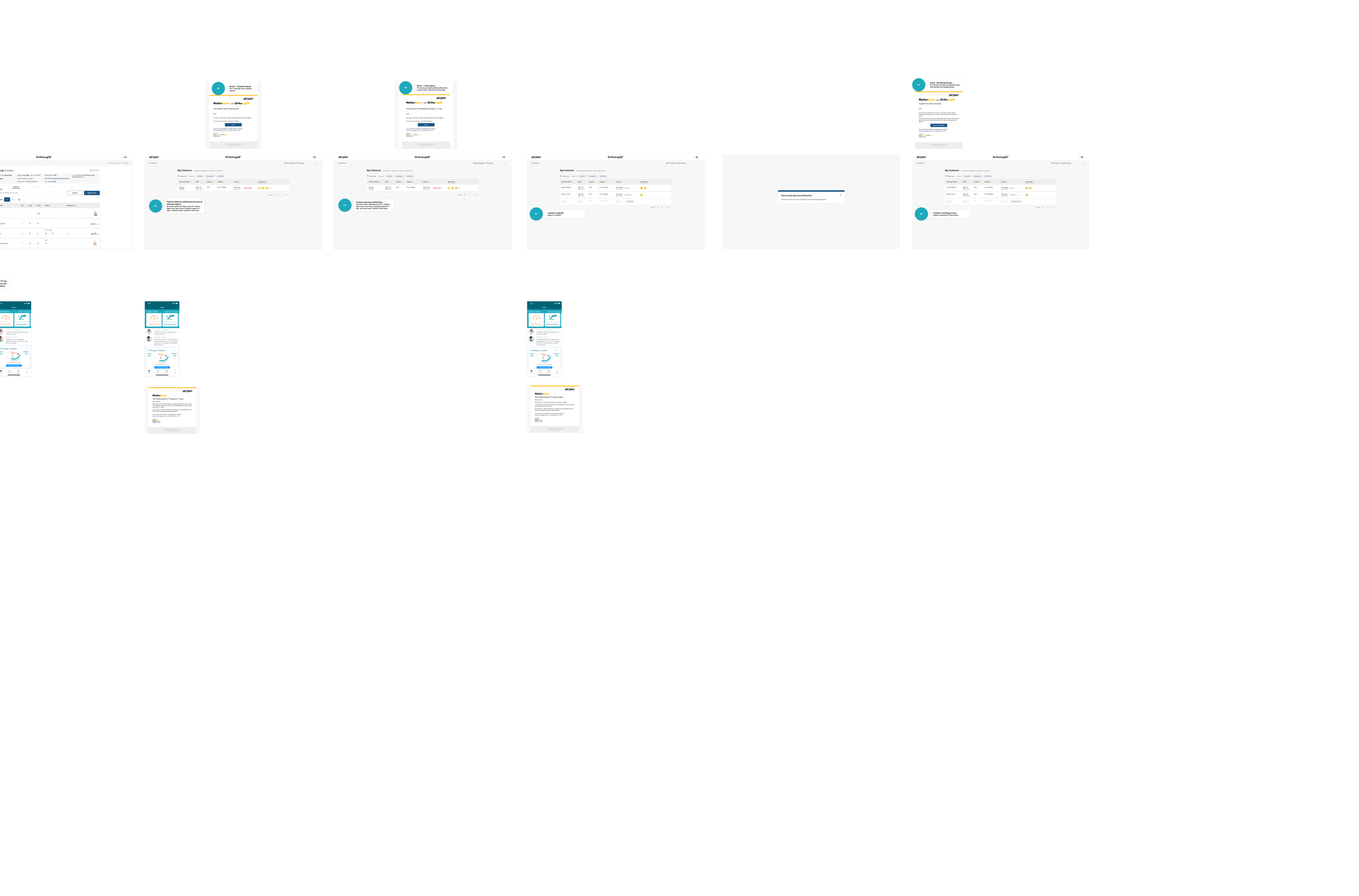
Note: This email is part of a broader sequence designed in the user flow, which includes notifications for both the patient and clinician sides. For example, the sequence also covers:
Notification to the patient when the PT accepts the invitation or registers successfully
Account creation confirmation sent to the PT
Notification to the patient if the invitation expires
Reminder to the patient of PT account expiry in 7 days
Reminder to the patient of PT account expiry in 1 day
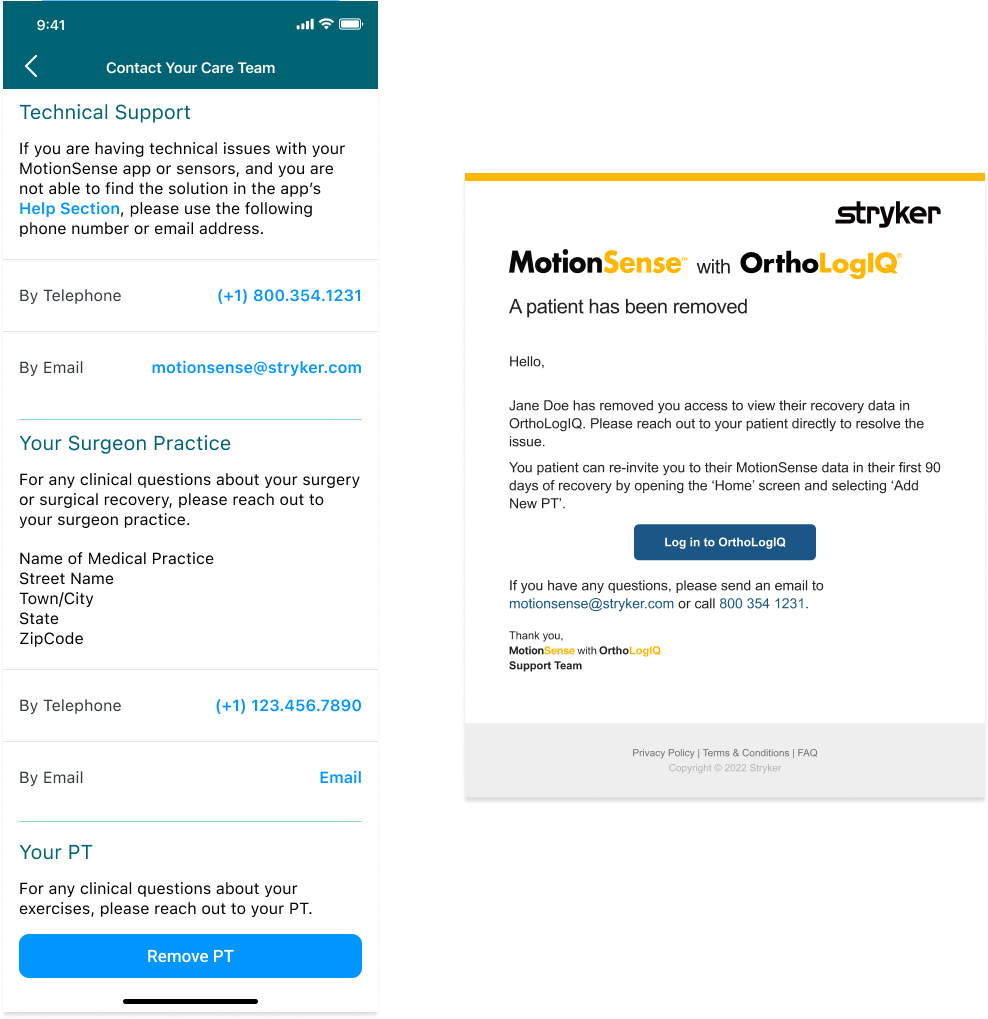
Notification to the PT when a patient has been removed from their account (without specifying the reason for removal)
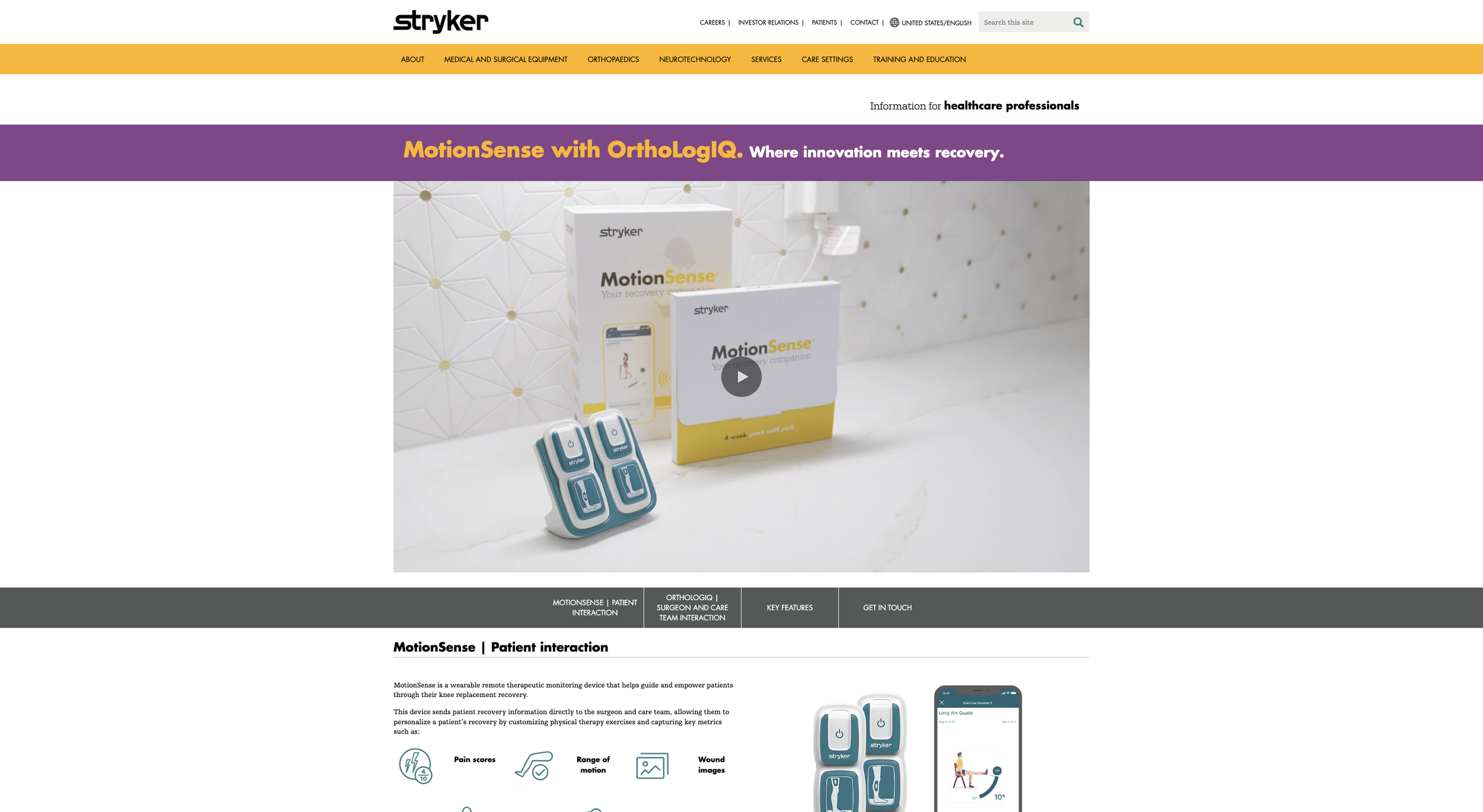
6. Marketing Landing Page:
Highlights the features and benefits of MotionSense and OrthoLogIQ, giving PTs context on what they are signing up for.
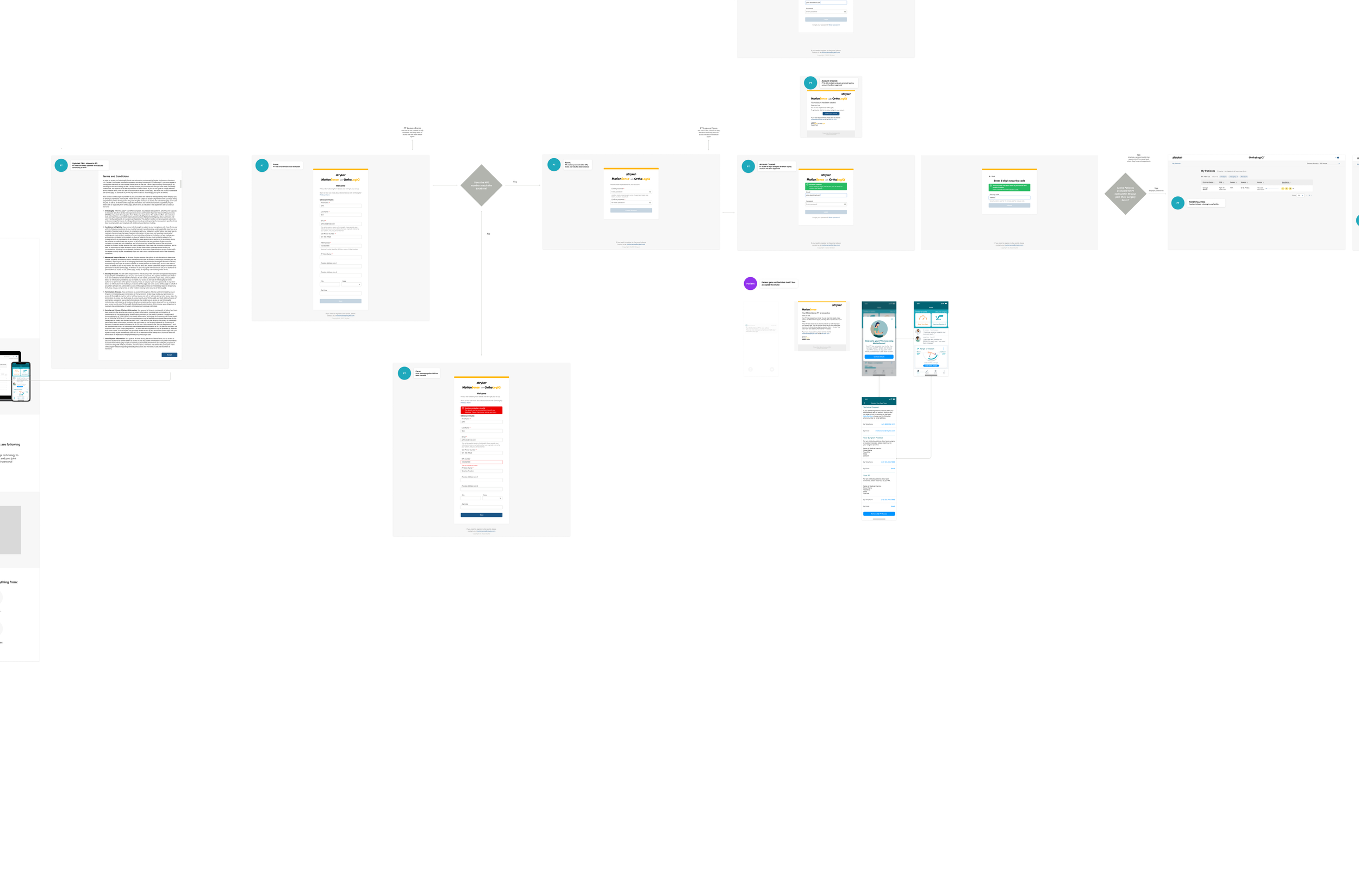
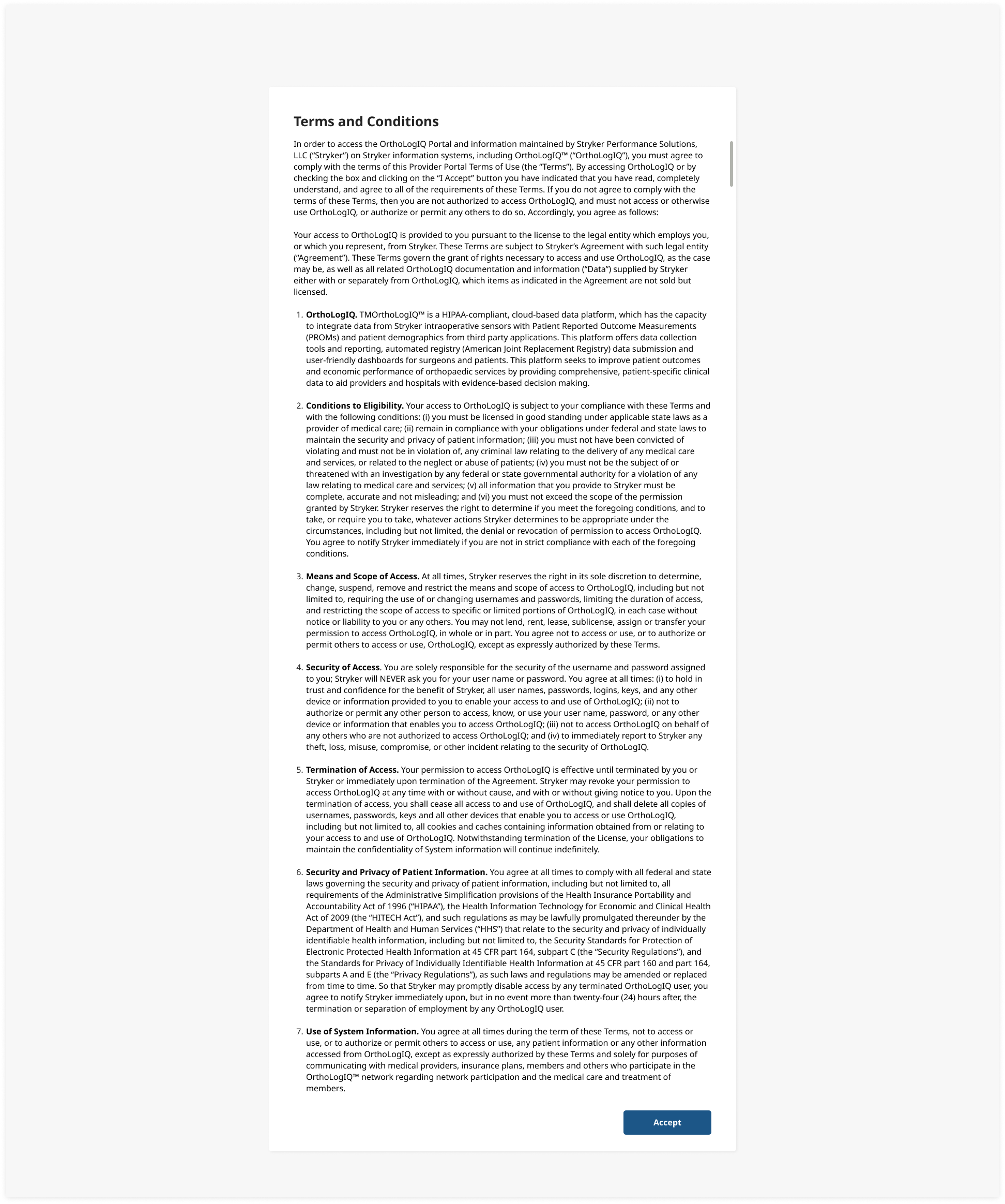
7. Updated Terms and Conditions Page:
Updated to be relevant for external PTs. The design was prepared, pending final copy from the legal and content team.
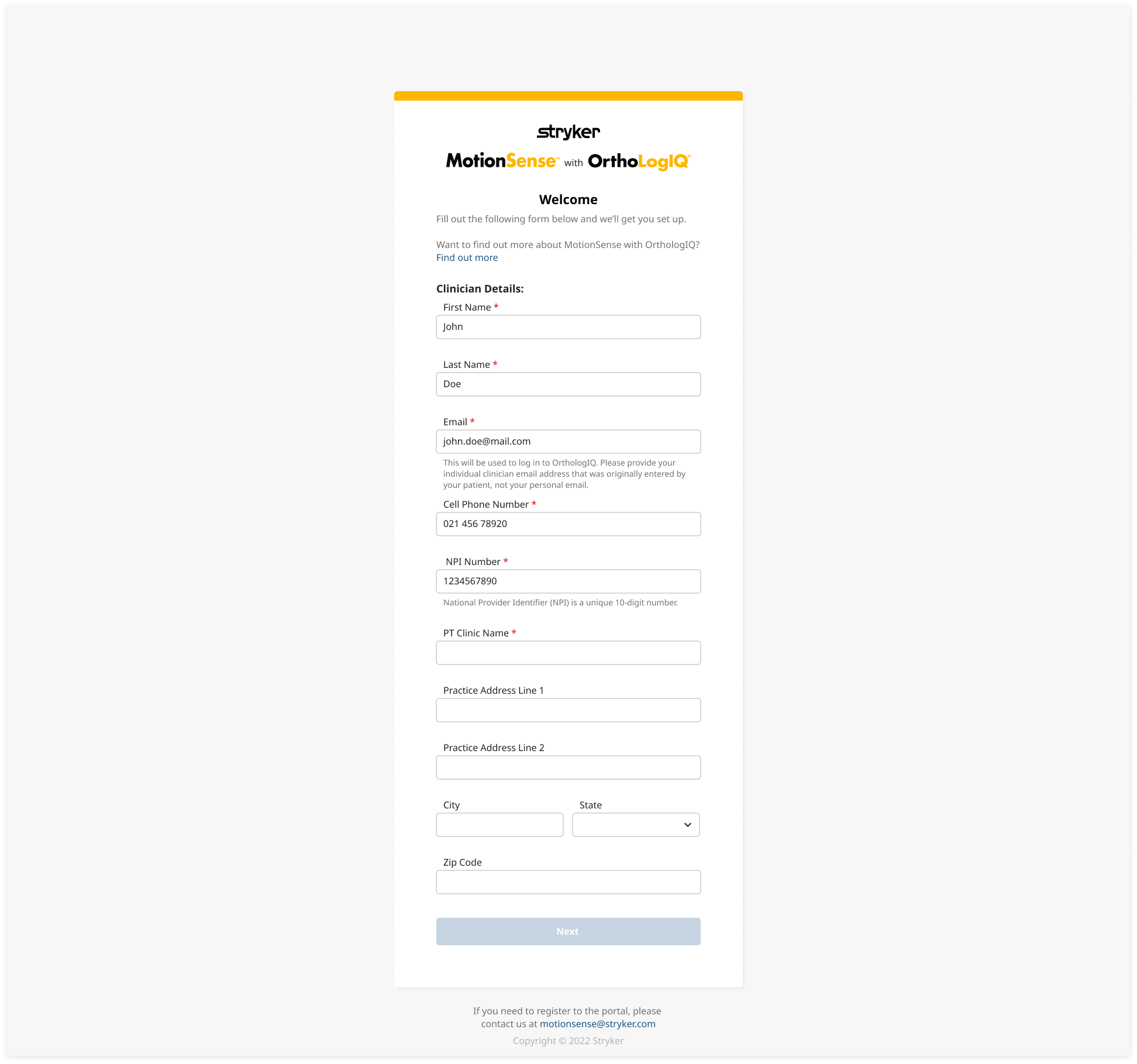
8. PT Signup Form:
PTs enter their details (name, email, phone number, clinic name and National Provider Identifier - NPI) to verify their legitimacy and protect patient data.
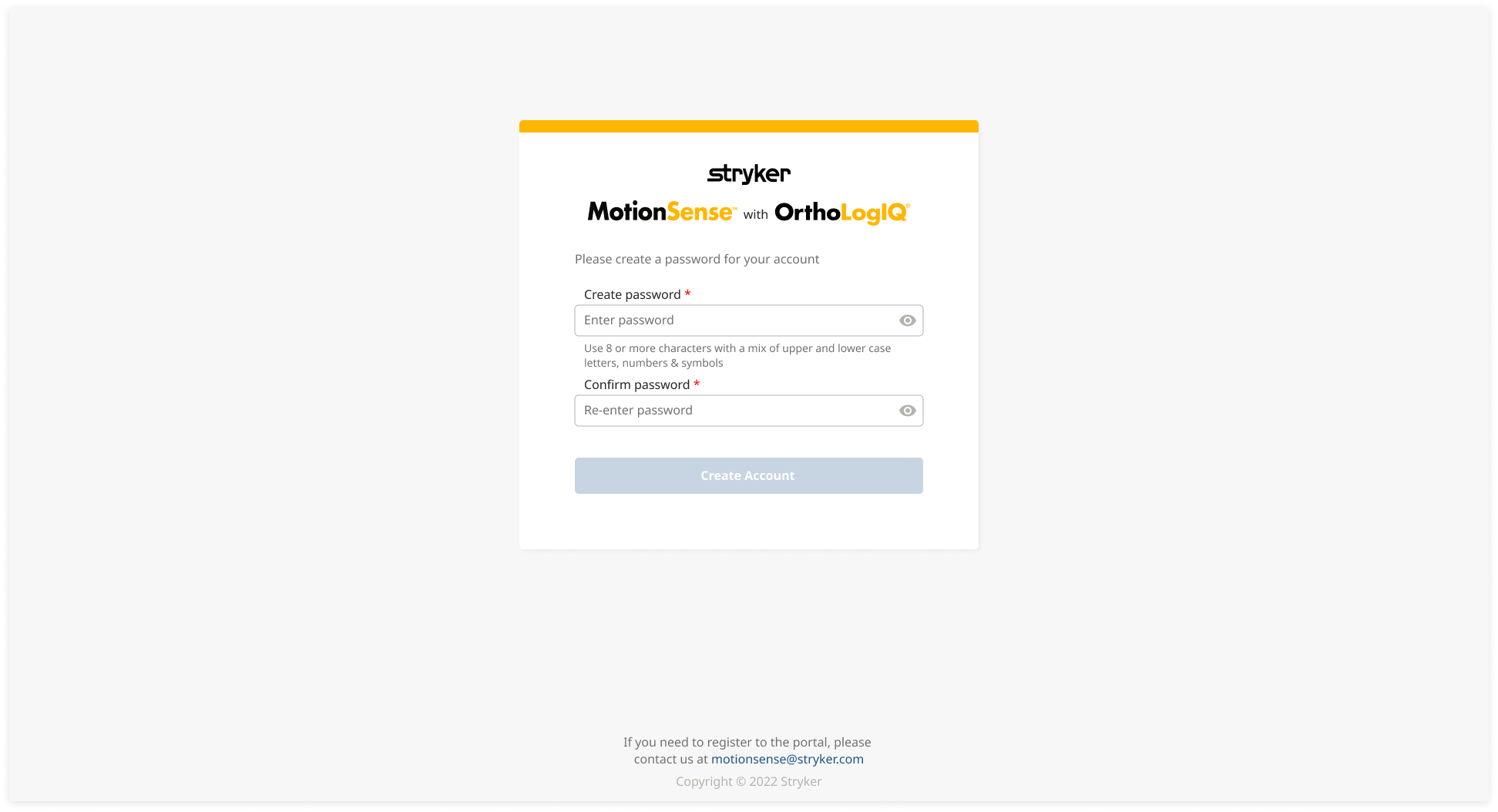
9. Create Password:
PTs create a password after submitting the signup form, and patients are notified when their PT creates an account.
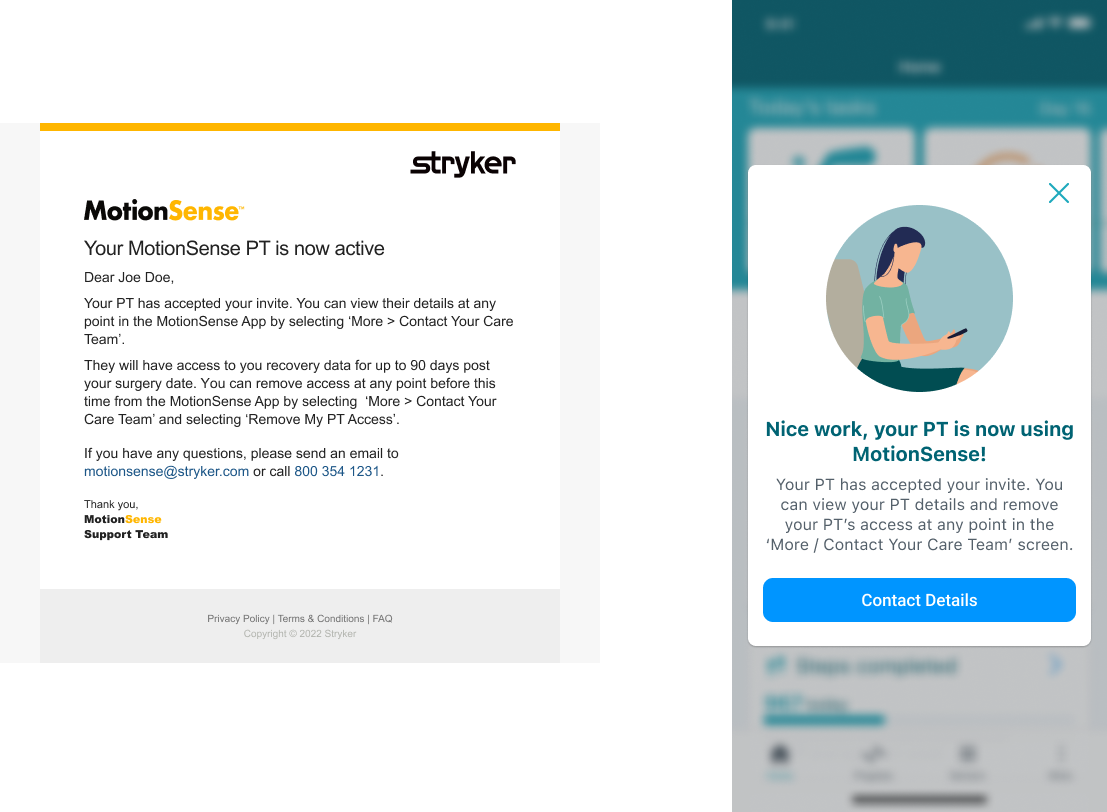
10. Status Updates:
The status of PT invitations is communicated to patients via email and displayed in MotionSense and OrthoLogIQ.
11. MotionSense App PT Contact and Revocation:
Patients can view PT details and have the option to revoke access if needed.

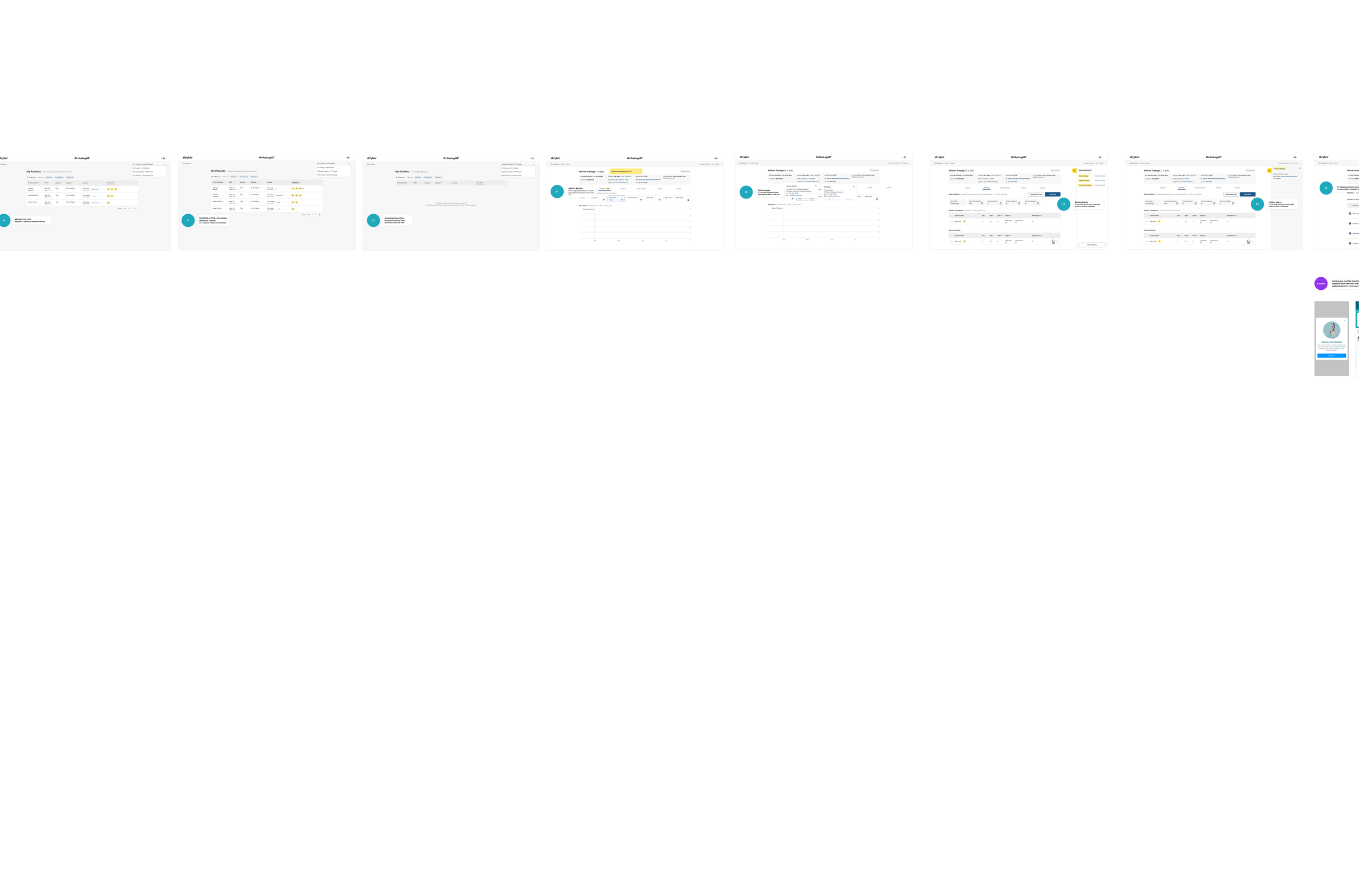
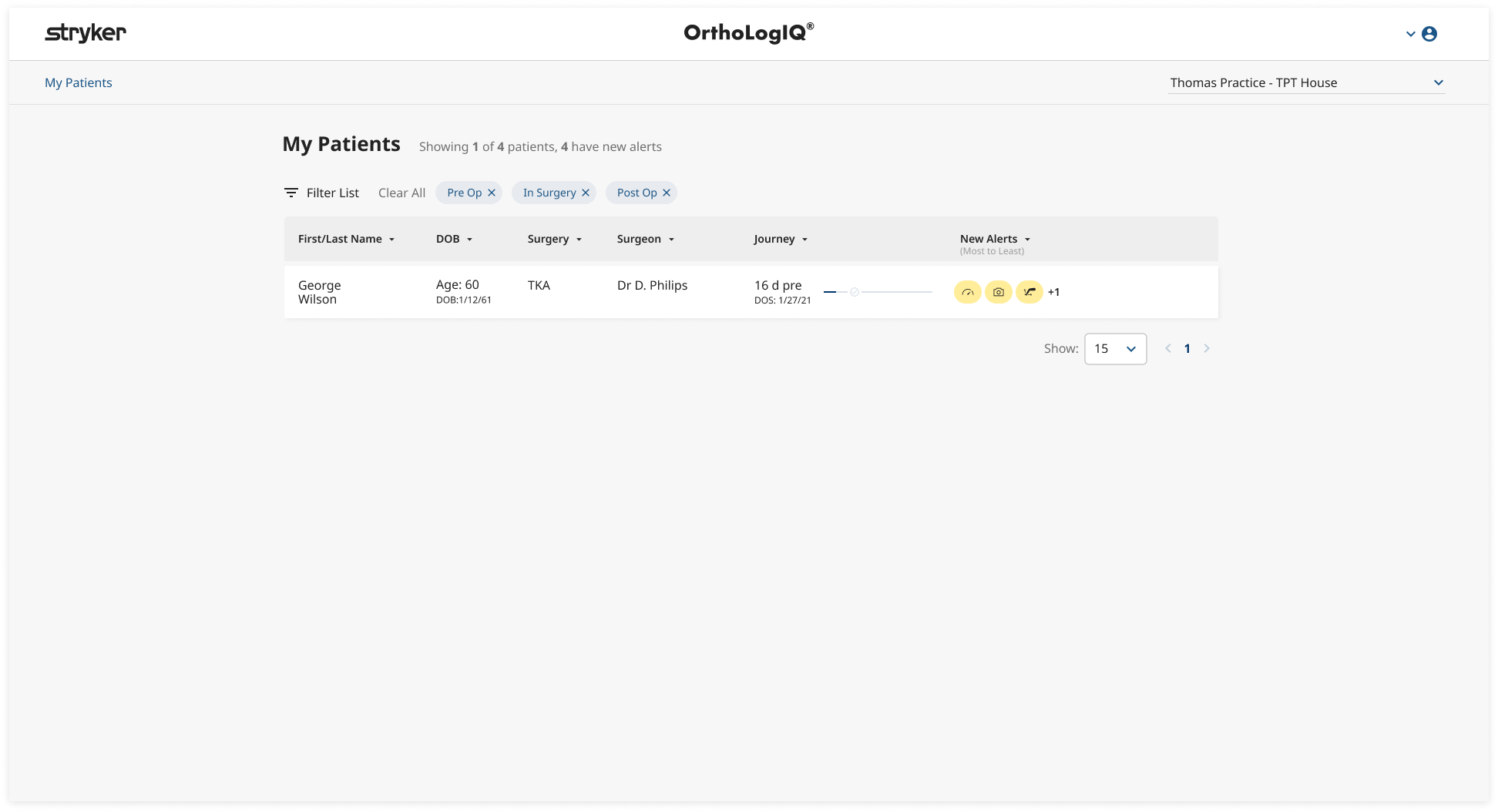
12. OrthoLogIQ PT View of Patient List:
PTs can view their patient list within their practice.
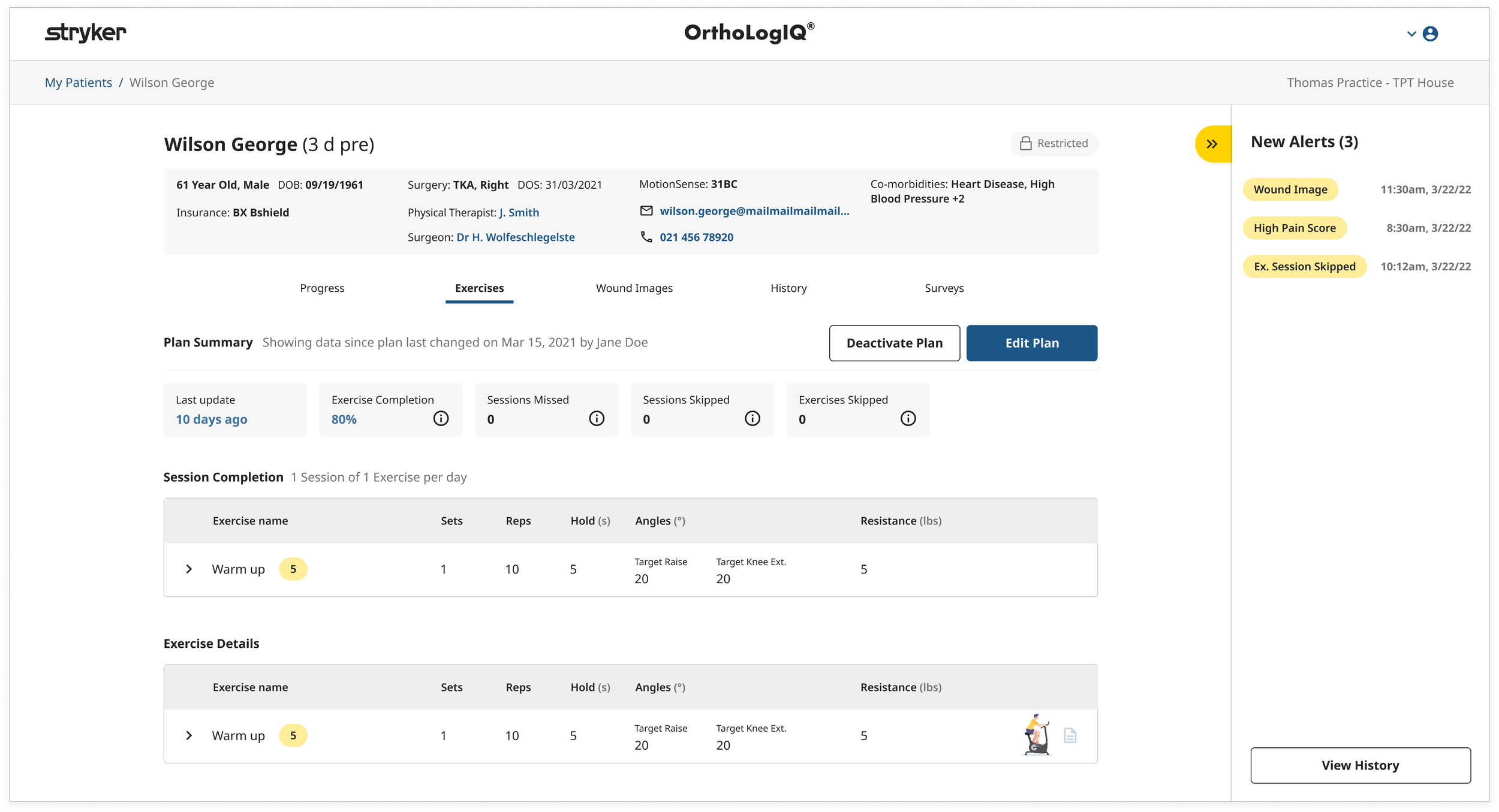
13. OrthoLogIQ PT View of Patient Alerts:
PTs can view patient alerts (e.g., wound images, pain scores, missed sessions) but cannot add notes or export billing data, as decided by stakeholders.
14. OrthoLogIQ PT View of Patient Details and Editing Permissions:
PTs have more restricted access compared to clinicians. While they can edit exercise plans, they cannot create new patients or modify personal information. Below is a side by side comparison of the Patient Details block showing the differences between what a practice user can view versus an external PT.
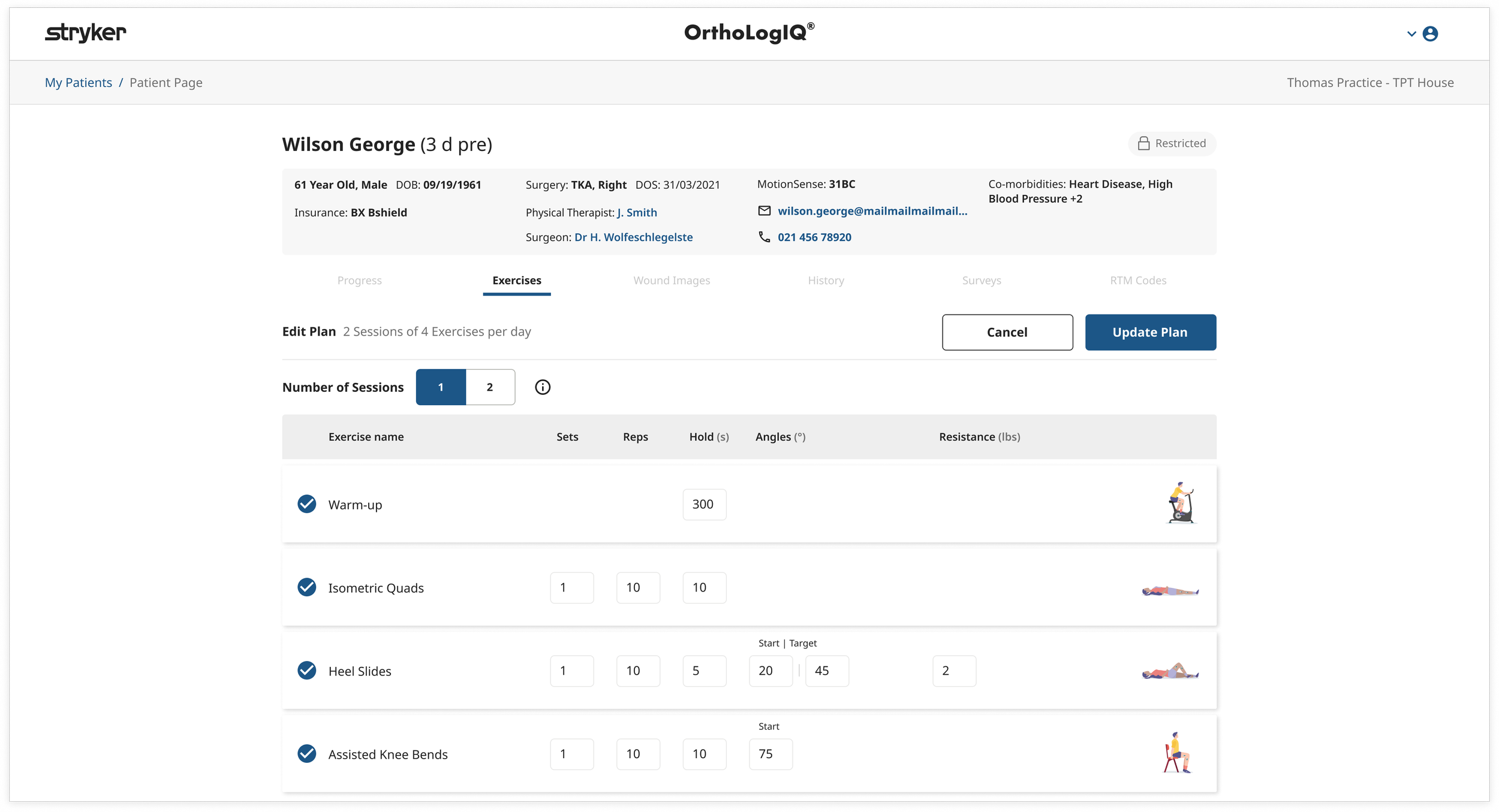
15. PT Editing Patient Exercises:
This feature addressed one of the key challenges we aimed to solve - allowing PTs to edit patient exercises. PTs can now adjust elements such as the number of reps, exercise order, and the number of exercises, depending on their expertise. This flexibility helps tailor exercise plans to the patient’s needs, enhancing motivation and supporting the business goal of improving patient compliance.
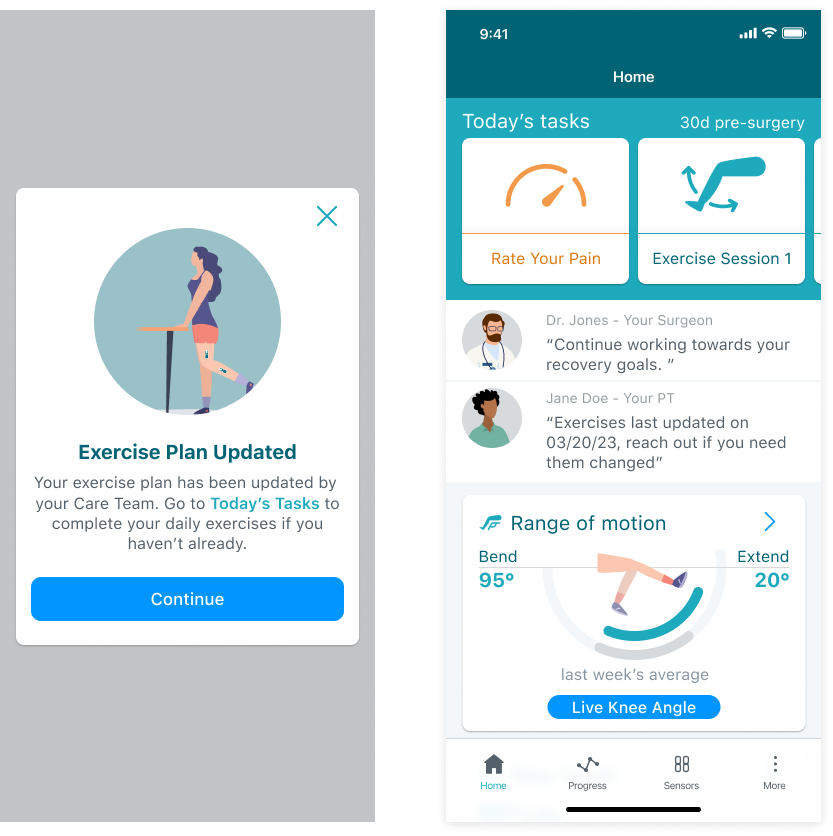
MS App Workflow and Final Designs
Testing and Feedback
Given limited direct access to PTs, I aligned stakeholders around using onboarding success metrics as an early proxy signal. This allowed us to validate the core access and setup flows without blocking release while planning for deeper validation in later phases.
Early signal (via Sales): PTs who were onboarded were able to complete setup successfully and reported that the core flows were clear and usable.
“PTs onboarded successfully and did not report usability concerns during setup.”
— Early onboarding signal used as proxy validation - Sales team feedback
Early validation therefore focused on real world onboarding signals gathered through the sales team. These insights provided confidence that the invitation and access experience was understandable, supporting progression into wider rollout while informing future iteration.

Final Takeaways - Impact and Key Results
This project delivered a scalable, secure PT Access system with clear clinical and product impact:
Patients were 54% more likely to remain active with their exercises after 30 days when PTs updated recovery plans
👥 I enabled secure, patient-invited PT access across both platforms for the first time.
🔄 I reduced surgeon and clinician administrative workload by enabling shared care responsibilities between surgeons and PTs
🔐 I designed a privacy first access model giving patients control over PT visibility and permissions
📈 I delivered a successful MVP establishing the foundation for future PT-facing features and billing workflows
Post launch reality & adaptability
Following CMS reimbursement changes in 2024, usage shifted from individual PTs to PT organisations. While this reduced direct adoption of the original flow, the underlying access model proved flexible enough to support organisation level onboarding - leading to renewed engagement more recently.
This reinforced the value of designing for regulatory uncertainty and long term adaptability.